The problem: every site opened over a business line concerns the line's owner
In most businesses the internet runs quietly in the background. At the front desk a guest connects a phone to the Wi-Fi, in accounting an employee clicks an "invoice" link in an email, and in the warehouse someone opens a betting site on their phone between shifts. All of these connections leave from the same public IP address, that is, from the line registered in the business's name.
When an activity carried out over the line is investigated, the question goes to the line's owner first. That is why malicious site blocking is not only an information security matter but a way for the business to protect itself: stopping access to an unwanted site up front is always easier than having to explain it afterwards. The risks vary from industry to industry, but they fall under four headings:
Phishing
Fake login pages that imitate your bank, your courier company or your email provider are the most common way corporate account credentials are stolen. It only takes one employee entering a password.
Malware
Malware usually comes from a file download server or from a command server that software on the device secretly connects to. Both start with a domain name, and the infection can spread to other devices on the network.
Gambling and illegal betting
Requests for gambling site blocking and betting site blocking come mostly from workplaces and guest networks. These sites change addresses often; keeping up with a manually maintained list is hard.
Adult content and children
On networks that children also join, such as schools, dormitories, hotels and hospitals, adult content blocking is a basic level of care that families and visitors expect from the business.
To these you can add crypto mining sites, which secretly use the device's processor through code embedded in the visited page, and addresses that distribute pirated content. They all have one thing in common: each one starts with a domain name. That is exactly why DNS is the most efficient place to filter.
Why filter at the DNS layer?
Almost every connection on the internet starts with the same step: the device asks DNS which IP address the name it wants to reach (e.g. ornek.example) is on. It cannot connect without the answer. DNS filtering works at this first step; when a blocked name is requested, the real address is not returned and no traffic is generated at all. For businesses, this approach has several concrete advantages:
- It covers every device. Employee computer, guest phone, smart TV, printer or camera, it makes no difference; every device that uses the network's DNS is protected by the same rules. For guest Wi-Fi content filtering there is, in practice, no other way, because you have no access to the guest's device.
- It needs no installation. You do not distribute software, profiles or certificates per device. The rule is defined once, centrally.
- It does not look inside traffic. A DNS filter does not inspect page content; it only evaluates the name. Nothing as heavy and privacy-sensitive as decrypting and reading encrypted traffic is done.
- It is consistent across branches. If you have more than one location, each branch's firewall connects to the same policy; a block you add in one place applies in the others too.
- It complements the firewall. Your firewall's web filter keeps working; the DNS filter adds a second, lightweight layer in front of it.
When people say "secure DNS", this is usually exactly what they mean: a resolver that does not answer for malicious names, verifies that its answers are not forged (DNSSEC) and serves only authorized devices. For details of the concept, see the What is DNS filtering guide.
How does DNS filtering work?
The job of DNS filtering software is to give a fast answer to a single question for every query: should this name be blocked? In izgate DNS the order of decision is as follows: first your company's allow list, then your company's block list, then the categories that are switched on and the USOM list. A name on the allow list opens even if it appears in a category.
A phone on the guest network wants to open ornek-bahis.example; the router forwards the query to izgate DNS over an encrypted connection.
The name is not on the allow list and appears in the Gambling and Betting category, which is switched on. izgate DNS does not return the real address.
The phone sees a "site not found" result and no connection is made. The attempt is recorded in the panel with time, device and category.
You choose what the user sees. The recommended and default view for guest networks is the "site not found" result; it needs no certificate and works smoothly on every phone. For computers managed by your organization, you can instead choose a branded block page that shows your logo, the site the user tried to open and its category. For this page to display correctly on HTTPS sites, your company's root certificate must be installed on the device; details and screen examples are on the DNS Security feature page.
Who is it for: DNS filtering by industry
What businesses that need DNS filtering have in common is that they share their network with devices and people they cannot control themselves. The role and the risk, however, vary by industry.
Workplaces and offices
Workplace internet filtering may bring productivity to mind first, but the real issue is security. A fake invoice link opened by an accounting employee, a fake delivery notice clicked by a sales representative or a "free" program downloaded by an intern can put the whole company network at risk. Betting sites being opened over the company line during working hours is also one of the questions an employer ends up facing. For details, see the Workplaces and Offices page and the employee internet use guide.
Hotels and hospitality
In a hotel, hundreds of different devices join the same network in a single night: a child's tablet in a family room, a business traveler's laptop, a visitor's phone in the lobby. Front-desk staff cannot touch any of these devices, which is why hotel Wi-Fi filtering is only possible at the network level. See Hotels and Hospitality.
Cafes and restaurants
Cafe Wi-Fi filtering has to be fast and silent: the customer connects, drinks their coffee and leaves. Waiters and cashiers have no time to deal with a filter. Because the default categories come switched on, gambling, adult content and phishing sites are blocked without any extra configuration. See Cafes and Restaurants.
Schools, training centers and dormitories
School Wi-Fi filtering keeps students from reaching adult content and gambling sites, and it also protects the devices of teachers and administrative staff from phishing. In dormitories, the network is used at night mostly by students' personal phones; here too DNS is the only practical layer. See Schools and Education.
Hospitals, factories and other organizations
A patient's relative's phone working in the same building as clinical devices in a hospital, shift workers and subcontractor staff sharing a common guest network in a factory, thousands of visitors connecting to the same hotspot in a shopping mall: all of these create a similar need. Whoever's device it is, malicious and inappropriate sites should not open. See Hospitals and Healthcare, Factories and Manufacturing.
Internet cafes: Businesses that offer internet access for a fee (commercial public use providers) have additional obligations, such as providing a safe internet service and preventing the filter from being disabled. izgate DNS does not claim to meet these additional obligations on its own. For details, see the Internet Cafes page.

Hotels and Hospitality
Families and business guests on the same network.

Schools and Education
Secure DNS on the student network.

Workplaces and Offices
Against phishing and malware.
Legal framework: Law No. 5651 and the content filtering obligation
Law No. 5651 (Turkey's Internet Law) places two basic measures on internet public use providers (toplu kullanım sağlayıcı): blocking access to content that constitutes a crime and keeping access records. This obligation also applies to a hotel, cafe or office that offers internet access free of charge:
"Ticari amaçla olup olmadığına bakılmaksızın bütün internet toplu kullanım sağlayıcılar, konusu suç oluşturan içeriklere erişimin engellenmesi ve kullanıma ilişkin erişim kayıtlarının tutulması hususlarında yönetmelikle belirlenen tedbirleri almakla yükümlüdür."
"Regardless of whether they operate for commercial purposes, all internet public use providers are obliged to take the measures specified by regulation regarding the blocking of access to content that constitutes a criminal offense and the keeping of access records relating to use."
Law No. 5651, Article 7/2 — mevzuat.gov.tr — unofficial translation
The details of these measures are in the Regulation on Internet Public Use Providers (2017). For all public use providers, regardless of commercial purpose, the Regulation states the first obligation as follows:
"a) Konusu suç oluşturan içeriklere erişimi önleyici tedbirleri almak amacıyla içerik filtreleme sistemini kullanmak."
"a) To use a content filtering system in order to take measures preventing access to content that constitutes a crime."
Regulation on Internet Public Use Providers, Article 4/1-a — mevzuat.gov.tr — unofficial translation
A "filtering system", in turn, is defined in the definitions article of the same Regulation, which explicitly lists the domain name:
"d) Filtreleme sistemi: İnternet ortamında web adresi, alan adı, IP adresi, kelime ve benzeri kriterlere göre erişimi engelleyen yazılımları ve donanımları,"
"d) Filtering system: The software and hardware that block access on the internet according to criteria such as web address, domain name, IP address, keyword and the like,"
Regulation on Internet Public Use Providers, Article 3/1-d — mevzuat.gov.tr — unofficial translation
izgate DNS is a filtering system that blocks access by domain name, and it can be used together with your firewall's web filter. That said, we make no claim such as "full compliance on its own" or "approved filter"; we recommend reviewing with your legal counsel how the Law No. 5651 content filtering obligation applies to your organization. The additional obligations of commercial public use providers (internet cafes and similar businesses) are regulated separately.
The filter is only one half of the obligation. The Regulation also requires access records to be recorded electronically and kept for two years (Art. 4/1-b). izgate keeps these records in a signed archive; for details, see the 5651-compliant logging page, and for the full framework, the Law No. 5651 guide, the Regulation summary and the content filtering and safe internet guide.
What does izgate DNS Security do?
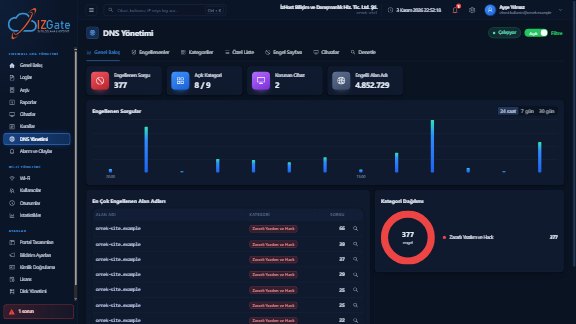
izgate DNS is izgate's own filtering DNS service, running on servers in Turkey. It is managed from the same panel as log management and guest Wi-Fi; every blocked attempt appears in the same place as your access records.
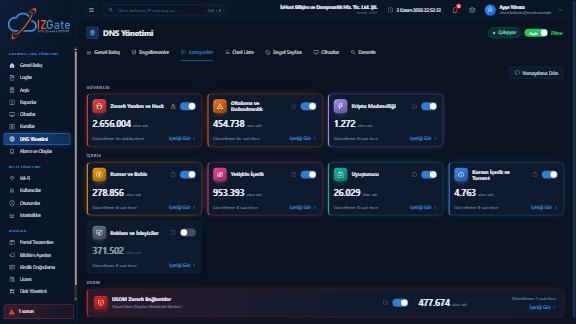
- Ready-made categoriesGambling and Betting (~279K names), Adult Content (~953K), Malware and Hacking (~2.66M), Phishing and Fraud (~455K) and Crypto Mining are on by default; Drugs, Piracy and Torrents, and Ads and Trackers are optional. You can view the contents of every category.
- USOM malicious link listThe list of Turkey's National Cyber Incident Response Center (USOM), with roughly 474 thousand entries, turns on with a single switch. Details: USOM malicious link list.
- Lists that update on their ownSecurity lists refresh every 6 hours and the others once a day. Sources are openly licensed international threat lists and USOM.
- Your own block and allow listsUp to 10,000 names; subdomains match automatically and the allow list overrides categories. Your settings apply only to your own networks.
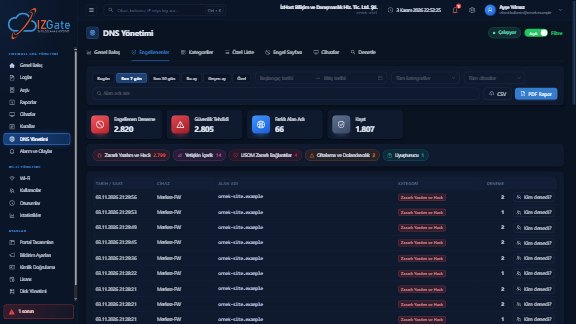
- Blocked and "Who tried?"A list of attempts filtered by date, category, device and domain, CSV export, and a certain or probable match to the user in your logs.
- Malicious Site Blocking ReportPDF, Excel or CSV with your logo; it can be scheduled. Blocks and false-block reports appear in the Alerts and Events feed. See Reports.
- Site category in logsLogs show the izgate category next to site names; you do not need your firewall's separate category license.
- Closed and validated serviceIt is not an open resolver and answers only your registered devices; DNSSEC validation is on. When the filter is connected, the guest portal shows the note "harmful and inappropriate content is blocked".
Which categories should you turn on?
The five categories that come on by default (gambling and betting, adult content, malware, phishing, crypto mining) are the right starting point for most businesses; you do not need to change anything else on day one. We also recommend turning on the USOM list: this list from a national source complements the international threat lists.
In schools, training centers and dormitories, turning on the Drugs and the Piracy and Torrents categories as well is a common choice; in offices, the piracy category reduces the risks that come from unlicensed software and movie downloads. The Ads and Trackers category comes switched off because it can affect how some sites work; before turning it on, we recommend trying it on your organization's devices for a few days. The Blocked screen guides your decision: within a few weeks you will clearly see which category is triggered and how often.
- Time
- 03.11.2026 21:14:07
- Domain
- ornek-bahis.example
- Category
- Gambling and Betting
- Device
- Guest network · MikroTik
- Who tried?
- mg-4a300c → guest record in the panel (certain match)
- Result
- Blocked · site not found
For panel screens, the category settings view and block page examples, go to the DNS Security feature page.
Setup: MikroTik and FortiGate
DNS Security works through your firewall that is registered and verified in izgate. In the recommended setup, the router forwards the queries of devices on the network to izgate DNS over an encrypted connection; that way queries cannot be read in transit, and izgate knows which company's policy to apply.
MikroTik
On RouterOS 7.19 and later, Automatic Setup configures DNS with one click. The connection uses DoH, and each router uses its own key. If the server cannot be reached, the router falls back to normal DNS within about 30 seconds and the internet is not cut off; when the server is back, the filter turns itself on again. See the MikroTik guide.
FortiGate
An encrypted connection is set up over DoT on FortiOS 6.2 and later, and over DoH on 7.0 and later. If you prefer, you can also start by entering the izgate DNS address only in the guest network's DHCP settings. izgate recognizes the query by the firewall's registered public IP address. See the FortiGate guide.
Verify the device
Your firewall is added to izgate with its access details, and the serial number is read from the device.
Connect DNS
Automatic Setup on MikroTik; DoT/DoH or guest DHCP on FortiGate.
Choose the policy
The default categories come on; add the USOM list and your own lists.
Monitor
Keep an eye on the Blocked screen and schedule the report weekly.
We explain why it matters that queries leave the network encrypted in the encrypted DNS: DoH and DoT guide. The full list of devices supported for log collection is on the Supported Devices page.
Limits: what does a DNS filter not do?
DNS filtering is a strong and practical layer, but it does not solve everything. We spell out the limits so that you know from the start what to expect in which situation:
- It works at the domain level. A site is blocked or opened as a whole. It does not distinguish a single page on the same site, the path part of an address or page content; rules that detailed are the job of your firewall's web filter.
- It can be bypassed with a VPN or encrypted DNS. A device that turns on a VPN, or uses an encrypted DNS server of its own choosing in its browser, never touches your network's DNS. Restricting direct outbound DNS and known VPN addresses with firewall rules makes this harder; you can view and edit FortiGate and MikroTik rules on izgate's Firewall Rules screen. Even so, we cannot say it will be prevented completely.
- A direct IP connection bypasses DNS. If an application or user connects with an IP address instead of a name, the DNS filter does not come into play.
- No list is complete. A newly registered domain can open until it makes it onto the lists; rarely, a harmless site can also end up in a category by mistake. For the first case there is your own block list; for the second, your allow list and "report a false block".
- The block page and HTTPS. On HTTPS sites, the branded block page displays correctly only on organization devices that have your root certificate installed; on a guest's phone the browser shows a warning. That is why "site not found" is recommended on guest networks.
- There is no filter while the server is unreachable. On MikroTik, if the server cannot be reached, the router falls back to normal DNS so that the internet is not cut off; the filter is not applied during that short period.
DNS filter, firewall web filter and device software compared
There are three common approaches to malicious site blocking. For most businesses the right answer is not to pick one but to combine the ones that fit.
| Criterion | DNS filter (izgate DNS) | Firewall web filter | Device software |
|---|---|---|---|
| Where it works | The network's DNS, before the connection | The firewall, while traffic flows | On each device itself |
| Guest devices | Covered, no installation | Covered | Not covered, cannot be installed on a guest's device |
| Block granularity | Domain (the whole site) | Down to URL and page level | Depends on the software |
| HTTPS | Traffic is not decrypted; decision by name | Detailed rules may require inspecting the traffic | Runs inside the device |
| License | Included in izgate Cloud, no extra charge | The firewall vendor's category license | Usually per device |
| Bypass routes | VPN, encrypted DNS, direct IP | VPN, some encrypted connections | A user who removes or disables the software |
| Visibility | Blocked, "Who tried?", report | Firewall logs (can be collected in izgate) | The software's own console |
| Best suited for | Guest Wi-Fi, branches, mixed devices | Staff network, detailed policy | Laptops that leave the organization |
A typical setup looks like this: on the guest network, izgate DNS is the least demanding first layer and is used together with the firewall web filter; on the staff network, a firewall web filter is added alongside izgate DNS; and for computers that leave the organization, device software is considered as well. We explain why you should separate guest and staff networks in this guide.
Frequently asked questions
What is DNS filtering and how does it work?
Before a device connects to a site, it asks DNS for the IP address of the domain name. DNS filtering looks at that question: if the name is in a blocked category or on your block list, the real address is not returned and the connection is never made. That way every device on the network is protected by the same rules, without installing any software on it.
Do I pay extra for izgate DNS Security?
No. DNS Security is included in the izgate Cloud subscription and has no separate charge. See the Pricing page for subscription options.
What do I need to do to block gambling and betting sites?
Connecting your device to izgate DNS is enough; the Gambling and Betting category is on by default. If you notice a name that is not yet in the category, you can add it to your own block list; subdomains match automatically as well.
Does content filtering on guest Wi-Fi require installing anything on the guest's phone?
No. The filter runs in the network's DNS; no app, profile or certificate is installed on the guest's phone, tablet or computer. The site not found result, which is the default block view for guest networks, does not require a certificate either.
What is the USOM malicious link list and how do I turn it on?
USOM is Turkey's National Cyber Incident Response Center, and it publishes the links it has identified as malicious as a list. In the izgate panel this list, with roughly 474 thousand entries, turns on with a single switch and is updated every 6 hours together with the security lists.
Does izgate DNS meet the Law No. 5651 content filtering obligation?
The Regulation requires all public use providers to use a content filtering system, and izgate DNS is a filtering system that blocks access by domain name. However, we do not claim full compliance on its own or an approved filter; we recommend using it together with your firewall's web filter and reviewing with your legal counsel how the obligations apply to your organization.
Can someone using a VPN or encrypted DNS bypass the filter?
Yes, they can. A device that turns on a VPN, or sends its DNS queries to an encrypted server of its own choosing, does not use your network's DNS. Restricting direct outbound DNS and known VPN or encrypted DNS addresses with firewall rules makes this harder, but we cannot say it will prevent it completely.
What happens if a site is blocked by mistake?
You add the site to your allow list; the allow list takes precedence over category blocks. If you use the branded block page, users can notify you through the report a false block link; these reports appear in the Alerts and Events feed.
Does the internet go down if the izgate DNS server cannot be reached?
Not if you connected with Automatic Setup on MikroTik: the router falls back to normal DNS within about 30 seconds, and the filter turns itself on again when the server becomes reachable. The filter is not applied during that interval.
Do I need a DNS filter if my firewall already has a web filter?
The two work at different layers and complement each other. Firewall web filter categories are tied to your firewall license; izgate DNS blocks at the domain level without a separate license and writes the izgate category next to site names in your logs. We recommend using them together.
Can I see who tried to open a blocked site?
Yes. The Who tried? link on the Blocked screen matches the attempt to a user in your logs. The match is shown as certain when a connection in the logs shows the site name, and as probable when it rests only on a DNS query made at the same time.
Which devices does DNS Security work with?
It connects with one click through Automatic Setup on MikroTik RouterOS 7.19 and later; on FortiGate over DoT with FortiOS 6.2 and later or DoH with 7.0 and later; or by entering the izgate DNS address in the guest network's DHCP settings.
This page is for information only; for the current text of the legislation, refer to the official source (mevzuat.gov.tr).