Short answer: The USOM malicious link list is a publicly available list, published on usom.gov.tr, of the phishing and malware addresses detected by Turkey's national cyber incident response center. By applying this list on your network as a firewall rule or a DNS filter, you can keep your employees and guests from connecting to known malicious addresses.
What is USOM?
USOM is the Turkish acronym for the National Cyber Incident Response Center, which operates within the Information and Communication Technologies Authority (BTK). It is also known internationally as TR-CERT; its duties include coordinating the response to cyber incidents across the country, detecting threats, and notifying the relevant parties.
One of USOM's best-known outputs is its malicious link list. Organizations, businesses, and individuals can access it at usom.gov.tr. Because the list is compiled at the national level, it can also cover addresses that target users in Turkey and may not yet appear on international lists.
What the malicious link list contains
The list brings together addresses that have been identified as malicious. These addresses usually fall into the following types:
- Phishing pages: Fake sites that imitate well-known institutions, banks, and shipping and e-commerce companies to collect usernames, passwords, or card details.
- Malware distribution addresses: Links that download malicious files disguised as fake updates, invoices, or documents.
- Servers that malware communicates with: Addresses that software infecting a device connects to in order to receive commands or send data.
Entries may be domain names, IP addresses, or full addresses (URLs). This distinction determines which tool you use to apply the list; we cover it separately below. The size of the list changes constantly: it grows as new detections are added, so a copy used without being kept up to date goes stale quickly.
Why it matters for phishing protection
In phishing attacks, the weak link is usually not a technical vulnerability but a distracted person. An employee in accounting opens an email titled "unpaid invoice," a front-desk clerk opens a "reservation canceled" message, a café customer opens a "your package is waiting" text. When the link is clicked, the first thing the device does is ask DNS for the address's name.
If the address is on the malicious list, it is stopped at this point: the fake login page never opens, and no form for entering a password appears on screen. Training and awareness remain the first line of defense against phishing; the network-level list is a second seatbelt that kicks in at the moment a person makes a mistake.
On a guest network the situation is a little different: the devices aren't yours, and you can't train the users. A hotel guest shopping from their room, a patient's relative in a hospital waiting room opening a fake fine notice on their phone, or a mall visitor tapping a promotional message can reach a phishing page through your network. The network-level list brings these people under the same protection without touching any device settings.
The same logic applies to malware. Software that has infected a device often can't do its job without communicating with a server: it can't receive new commands or send the data it has collected. If the address of that communication is on the list, the connection can't be established and the damage stays limited.
For a business, this isn't only a technical matter. The internet line is in the business's name; when a transaction made from the organization's network with a compromised account, or traffic generated by a malware-infected device, is investigated, the question goes first to the owner of the line. Blocking known malicious addresses from the start reduces the number of such incidents.
Three ways to use the list on your network
| Method | Freshness | Coverage | Effort |
|---|---|---|---|
| Downloading manually and loading it onto the firewall | Frozen at the time of loading | Traffic passing through the firewall | High; repeated with every update |
| The firewall's external list feature | Depends on the device's fetch interval | Traffic passing through the firewall | Medium; device capacity and license are decisive |
| DNS filter | Depends on the service's update frequency | All devices that make DNS queries | Low; the network's DNS setting |
Manual loading is fine for a one-time trial on a small network, but since the list keeps growing, it isn't a permanent solution. Very large address lists can also strain the object and rule capacity of some firewall models.
The firewall's external list feature means the device itself fetches a block list from an address at set intervals. Some FortiGate, pfSense, and OPNsense configurations support such externally sourced lists; the supported entry types, list size limit, and required license vary by device model and version. We recommend not connecting a large list without first checking your device's documentation.
A DNS filter applies the list's domain entries to the queries of every device on the network. Everyone, guest phones included, gets the same protection, and no load is placed on the firewall's capacity. We explained how DNS filtering works in a separate guide.
Domain, IP, and URL entries
The entry types on the list suit different tools. Domain entries are the natural territory of a DNS filter: when the name is queried, no answer is given. Entries given only as an IP address are addresses that can be connected to directly without a DNS query; for these, a block rule on the firewall is the better tool.
Entries in full-URL form need care. Such an entry may point to a single compromised page of a legitimate site. Blocking at the domain level in that case shuts down the entire site; distinguishing at the page level requires the firewall's web filter. In practice, the strongest setup is to use a DNS filter for domain entries and a firewall rule for IP entries together.
How to handle false blocks
No threat list is flawless. A site that was compromised and later cleaned up may stay on the list for a while; an address on a shared hosting service may be affected by a problem with another site on the same infrastructure. These cases are rare, but they can disrupt the workflow.
Three habits are recommended for handling false blocks. First, use an organizational block page on company devices so employees can easily notice and report a block. Second, when adding an address that is genuinely needed for work to the allow list, note why it was added. Third, review the allow list at regular intervals and remove entries that are no longer needed. The allow list is a powerful tool; if it grows unchecked, it weakens the protection itself.
Finding a suspicious device through blocked attempts
Not every attempt caught by the malicious list is a user's click. Queries going to the same malicious name from the same device, at night or at regular intervals, can be a sign of malware on the device trying to communicate. In that case the block is as much an alarm as it is a protection.
In an office, after opening the attachment of a fake invoice email, the accounting computer tries to connect to an address on the USOM list every few minutes.
The queries are blocked; on the Blocked screen, repeated security threat attempts from the same internal IP and device stand out.
The IT team disconnects the computer from the network and scans it; because the incident remains on record with user and time information, it can also be documented later.
If the same symptom appears on the guest network, ending the relevant guest session and, if necessary, preventing the device from reconnecting protects the other users. Separating guest and staff networks from the start limits the spread of such incidents; details are in the guide to separating guest and staff networks.
The USOM list in izgate
In izgate DNS Security, the USOM malicious link list (about 474 thousand entries) turns on with one click from the panel and updates automatically; there's no need to download, convert, or load the list onto a firewall. This list adds a national layer alongside the Phishing and Fraud (about 455 thousand domains) and Malware and Hacking (about 2.66 million domains) categories, which are on by default; the sources of these categories are openly licensed international threat lists.
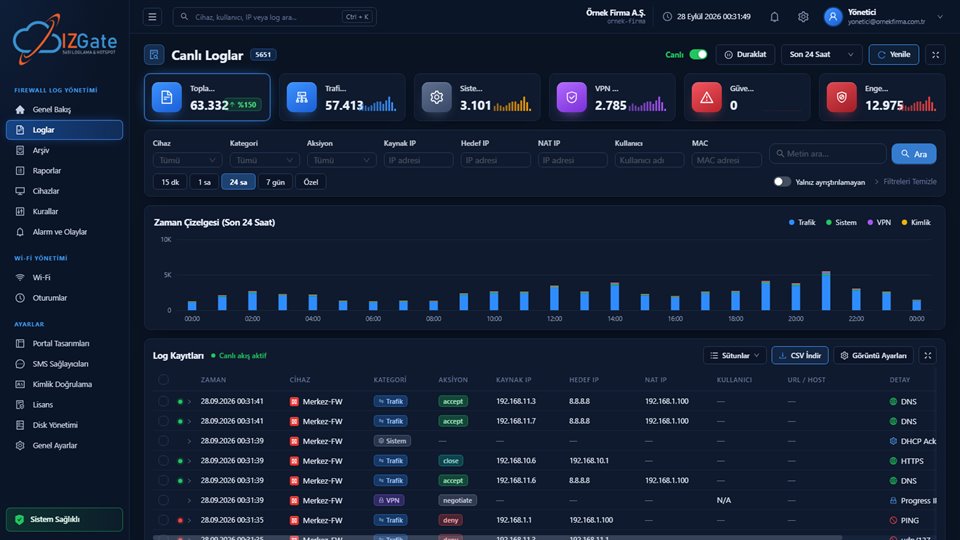
The Blocked screen shows the number of attempts and security threats separately; it can be filtered by date, category, device, and domain, and exported as CSV. The "Who tried?" section matches an attempt to the user in the logs. Blocks and false block reports appear in Alerts and Events; the company's own allow list overrides the categories and lists. In the logs, the izgate category appears next to site names. For panel details, see the DNS Security feature page.
Checklist
- Is the USOM list being applied on your network in up-to-date form, or is an old copy in use?
- Are domain entries covered by a DNS filter and IP entries by a firewall rule?
- Are the phishing and malware categories turned on as well?
- Are repeated security threat attempts reviewed regularly?
- Are false block reports followed up, and is the allow list reviewed?
- Have employees been informed about phishing?
Frequently asked questions
Is using the USOM list mandatory?
The legislation does not require public use providers (toplu kullanım sağlayıcı) to use a specific list; it requires them to use a content filtering system. The USOM malicious link list is a public, nationally compiled resource against phishing and malware addresses, and using it is a strong security practice.
How often is the USOM list updated?
The list keeps growing as newly detected malicious addresses are added. That is why downloading it once and loading it onto a firewall goes stale quickly; you need a firewall feature that pulls the list automatically, or a DNS filter that keeps the list up to date on its own.
What should I do if a site on the list is blocked by mistake?
A legitimate site that was compromised and then cleaned up may stay on the list for a while. If you need it for work, you can unblock it by adding the domain to your allow list and then keep an eye on whether the situation is resolved. A false block report on the organization's block page makes it easier for the administrator to see such cases.
Does the USOM list replace other phishing lists?
No; it complements them. International threat lists cover global attacks at a broad scale, while the USOM list adds addresses detected at the national level. Using both sources together widens coverage, especially against phishing attempts that target users in Turkey.
This page is for information only; for the current text of the legislation, refer to the official source (mevzuat.gov.tr).
Related guides
What Is DNS Filtering and How Does It Work?
The basics of how lists are applied on a network.
PracticeContent Filtering and Safe Internet
The filtering obligation and a two-layer setup.
SetupEncrypted DNS (DoH/DoT) and the Guest Network
Network settings that keep the filter from being bypassed.