
Short answer: DNS filtering is a security method that answers the domain name queries of devices on a network according to a policy. If the requested name is in a blocked category such as gambling, phishing, or malware, the DNS server does not return the real address, and the device cannot connect to the site. Without installing software on devices, it protects the whole network, guest phones included, from a single point.
What is DNS: the internet's address book
On the internet, devices find each other by IP address, while people remember domain names. DNS (the Domain Name System) is the translation service that connects these two worlds. When an employee types the name of a news site into the browser, the computer first asks the DNS server assigned by the network, "what is the IP address of this name?"
If the DNS server knows the answer, it replies immediately; if not, it asks the authoritative servers for that domain, learns the answer, and keeps it in its cache for a while. Only after the answer reaches the device does the actual connection begin. In other words, every web page, every app notification, and every background update starts with a DNS query before it happens. This order makes DNS the earliest and broadest control point on the network.
Which DNS server the devices on your network use is usually determined by DHCP, that is, by the settings handed out automatically when a device joins the network. This detail matters for understanding how filtering is set up and how it can be bypassed; we will come back to it below.
How DNS filtering works
A filtering DNS server compares every incoming query against a set of lists before answering. A typical decision order looks like this:
- Allow list: If the name is one the organization has specifically allowed, it is answered directly; categories do not come into play.
- The organization's block list: If it is one of the names the organization has added itself, it is blocked.
- Category lists: If the name appears in the list of an enabled category (gambling, adult content, phishing, malware…), it is blocked.
- Normal resolution: A name that matches none of these is answered just as an ordinary DNS server would.
Matching usually covers subdomains as well: if a list contains example.com, then www.example.com or login.example.com match the same rule. The answer to a blocked query can take one of two forms: an answer meaning "no such name exists" (the user sees "site not found" in the browser), or an address that serves the organization's block page.
- Time
- 14:32:07
- Querying device
- 10.20.0.48 (guest network)
- Requested name
- prize-campaign.example-domain.example
- Match
- Phishing and Fraud category
- Decision
- Blocked — "site not found" answer
In this flow, the page content on the device is not touched and its traffic is not decrypted. The filter only answers one question: "should this name be given an address?" Its simplicity is both its strength and its limit.
Why filter at the DNS level
DNS-based content filtering offers practical advantages, especially on networks where many different devices connect:
- No installation on devices. You cannot install software on a hotel guest's phone or a café customer's tablet; a DNS filter comes with the network settings.
- It covers all apps. Not just the browser: a link in a messaging app, or an attempt by malware running in the background to reach its server, also goes through DNS first.
- No need to decrypt encrypted traffic. Inspecting HTTPS content requires distributing certificates to devices; a DNS filter works without that step.
- It stops things early. Because the block happens before a connection is made, not a single byte of a malicious page reaches the device.
- It needs no traffic inspection. The decision is made from the domain query alone; the firewall does not need to inspect traffic line by line.
What a DNS filter cannot see
An honest assessment requires knowing the limits. A DNS filter opens or closes a site as a whole; it cannot single out one page or video under the same domain name. If you want to close off only part of a large platform, that is the job of a web filter that works at the address level.
There are also ways around it. A user can change the device's DNS setting manually and send queries to a public DNS resolver outside the network; if a browser's built-in encrypted DNS setting is turned on, queries never reach your network's DNS; and a device using a VPN sends all its traffic through the tunnel. Going to a site directly by IP address also bypasses DNS, although this is rare in everyday use.
Most of these paths can be narrowed on the network side: allowing only DNS traffic to your own DNS server on the firewall, handing out a single DNS address in the guest DHCP, and restricting encrypted DNS endpoints are the most common practices. You can find detailed steps in the encrypted DNS (DoH/DoT) guide. It is best to accept from the start, however, that VPNs cannot be fully prevented on a guest network.
Finally, it helps to know about the caching effect: when you add a name to the block list, a device that has just resolved that name may keep using the old answer in its cache for a while. The block takes effect once the cache time on devices expires; if you don't see it immediately, this is usually not an error.
DNS filter vs. firewall web filter
The two methods are not rivals but complements. The table below summarizes which problem is solved at which layer:
| Topic | DNS filter | Firewall web filter |
|---|---|---|
| Decision level | Domain name (the whole site) | Domain name and address path (page level, depending on configuration) |
| HTTPS page content | Doesn't see it, and doesn't need to | Detailed inspection requires certificates on devices |
| Setup | The network's DNS setting | A filter profile and policy on the firewall |
| Category data | The DNS service's lists | The firewall vendor's license |
| App traffic | Every app that makes a DNS query | Traffic the profile is applied to |
From a legal standpoint, the Regulation on Internet Public Use Providers describes a filtering system with a broad definition that also includes domain names:
"Filtreleme sistemi: İnternet ortamında web adresi, alan adı, IP adresi, kelime ve benzeri kriterlere göre erişimi engelleyen yazılımları ve donanımları,"
"Filtering system: The software and hardware that block access on the internet according to criteria such as web address, domain name, IP address, keyword and the like,"
Regulation on Internet Public Use Providers, Article 3/1-d — mevzuat.gov.tr — unofficial translation
A DNS filter that blocks by domain name is of the type in this definition. Who the obligation covers and how it relates to safe internet service is explained in detail in the content filtering and safe internet guide.
Use on business and staff networks
On the staff network, the goal is twofold: to protect the organization's devices from phishing and malware sites, and to prevent the workplace line from being used for inappropriate purposes. The internet line is registered in the business's name; when a betting site an employee opened during working hours, or a fake invoice link they clicked, is investigated, the first question goes to the owner of the line.
A branded block page is a good choice on this network: the employee sees why they were blocked and which category the site fell into, and can report it if a site they actually need for work was blocked by mistake. For this page to appear without warnings on HTTPS sites, the company's root certificate must be installed on the organization's devices; on managed computers this is usually distributed centrally.
Any filter can mistakenly place a service required for work into a category. The allow list exists for this: a name added to the allow list stays open regardless of categories. Announcing the filter policy to employees in writing is also important, both for transparency and to strengthen the business's position in any dispute. We explained why staff and guest traffic should be separated from the start in the separating guest and staff networks guide.
Use on guest networks
On a guest network, the devices are not yours; you cannot install certificates or impose settings. That is why answering blocked queries with "site not found" is the cleanest solution: no security warning appears on the guest's phone, the page simply does not open. A branded block page, by contrast, turns into a browser warning on guest devices for HTTPS sites and causes a trust problem.
A few setup rules stand out for guest networks. DHCP should hand out only the filtering DNS address, and the firewall should block other DNS traffic going out from the guest network. The captive portal should briefly tell guests that access is logged and that inappropriate content is blocked. Enabling categories such as ad blocking on a guest network should be considered carefully, as it may cause some apps to malfunction.
In venues where children and families are present (a hotel lobby, a hospital waiting room, a shopping mall), having the adult content and gambling categories enabled is the expected standard. In such settings, everyone who connects to the guest network receiving the same protection is also part of the business's public responsibility.
Choosing categories by venue
Not every business has to enable the same categories. The suggestions below can be used as a starting point:
- Offices and workplaces: Malware, phishing, crypto mining, and gambling without exception; piracy and torrents are recommended to protect company devices from legal and technical risk.
- Hotels and hospitality: Security categories and adult content; ad blocking is usually kept off so as not to spoil the guest experience.
- Schools, courses, and dormitories: Drugs and piracy in addition to the default categories; this sector is expected to have the most comprehensive setting on the student network.
- Cafés and restaurants: The default categories are sufficient in most cases; they close off risky sites without interfering with customers' everyday use.
- Factories and manufacturing: Security categories take priority for computers and devices on the production network; the guest network used by shift workers is filtered separately.
How it works in izgate DNS
izgate DNS Security is izgate's own filtering DNS service; it is included in the izgate Cloud subscription at no extra charge, and its server is in Turkey. By default, the Gambling and Betting (about 279 thousand names), Adult Content (about 953 thousand), Malware and Hacking (about 2.66 million), Phishing and Fraud (about 455 thousand), and Crypto Mining categories are on. The Drugs, Piracy and Torrents, and Ads and Trackers categories, as well as the USOM malicious link list, turn on with one click in the panel.
The lists update automatically: security lists every six hours, the others once a day. Your company can keep its own block and allow lists of up to 10,000 names; the allow list overrides categories, and matching covers subdomains. Each company's settings apply only to its own networks. The service is not an open resolver; it answers only registered devices, and DNSSEC validation is on.
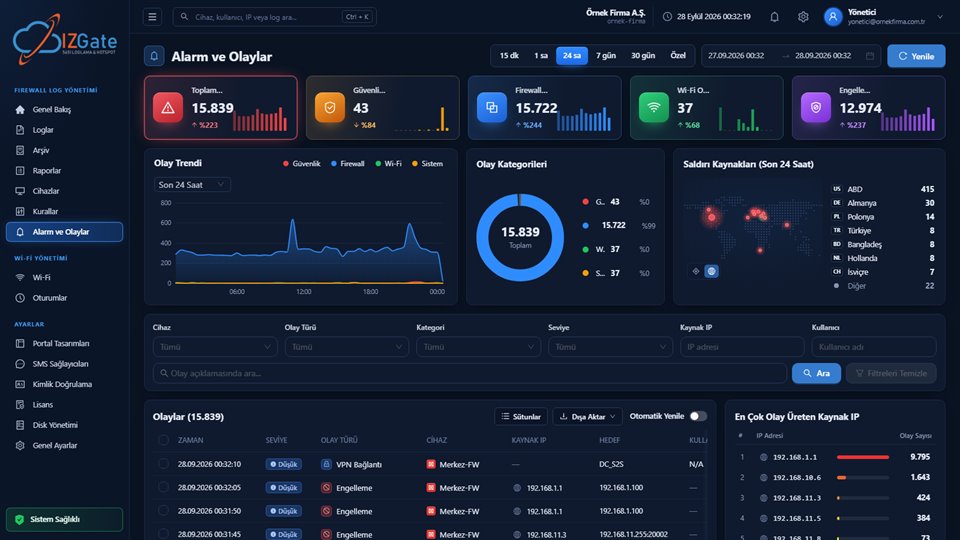
The Blocked screen can be filtered by date, category, device, and domain name; the "Who tried?" section matches a blocked attempt to the user in your logs. Blocks and false-block reports appear in Alerts and Events; the Malicious Site Blocking Report can be produced as PDF, Excel, or CSV and scheduled. For panel details, see the DNS Security feature page.
Checklist
- Are the staff and guest networks separate, and has the right block view been chosen for each?
- Does DHCP hand out only the filtering DNS address to devices on the network?
- Does the firewall restrict DNS traffic other than to your own DNS server?
- Do the enabled categories suit the user profile of your venue?
- Are sites required for work on the allow list, and are false-block reports followed up?
- Has the filter policy been announced to employees and briefly stated on the guest portal?
- Can you see and report blocked attempts per user?
Frequently asked questions
Does DNS filtering slow down the internet?
A DNS filter does not open and inspect the content of traffic; it only decides the answer to a domain name query. The list check per query takes very little time, and because answers are cached on devices, users generally notice no difference. The main factor in speed is the network distance to the DNS server.
Does a DNS filter also work on HTTPS sites?
Yes. Before a device connects to a site, it looks up the site's name through DNS; if the query is blocked, the connection never starts. This is independent of whether the site uses HTTPS. However, the filter blocks or opens a site as a whole; it cannot look at page content or the path part of an address.
On a guest network, is a block page or a "site not found" answer better?
A "site not found" answer is recommended on guest networks. On HTTPS sites, a branded block page appears cleanly only on devices that have the company's root certificate installed; on guests' phones, the browser shows a security warning. On the staff network, where the organization's own devices are, a branded block page clearly shows the user the reason.
Is a DNS filter enough on its own?
A DNS filter is a strong first layer at the domain level and easy to set up, but it does not see everything. A device using a VPN, or queries sent to a DNS server outside the network, can bypass the filter. Restricting outbound DNS traffic on the firewall and, where needed, using the firewall's web filter alongside it raise the level of protection.
This page is for information only; for the current text of the legislation, refer to the official source (mevzuat.gov.tr).
Related guides
Encrypted DNS (DoH/DoT) and the Guest Network
How encrypted DNS in the browser bypasses the filter, and how to prevent it.
PracticeThe USOM Malicious Link List
Using the national list on your network against phishing.
PracticeBlocking Gambling and Betting Sites
Measures against illegal betting on workplace and guest Wi-Fi.