
Guest portal
Every person verified on guest Wi-Fi gets a fixed alias code (mg-xxxxxx); this code, not the raw identity, is written to the firewall and the logs. The search screen resolves the code to a name, phone number or Turkish ID.
izgate runs records from FortiGate, MikroTik, pfSense, OPNsense, Sophos, Palo Alto and generic syslog sources through a disk queue, makes them searchable in seconds in Live Logs, and writes them to a signed, timestamped archive at the same time. A log line is never lost, and never silently changed.
No step moves to the next until the previous one proves its job is done. That's why a power outage or a service restart doesn't mean a lost log.
The firewall sends events over syslog: UDP 5514, TCP 5515 for reliable delivery, or TLS 6514 if a certificate is configured.
Every incoming line is written to disk first and processed in batches (≤2,000 lines / ≤500 ms); an unprocessed line stays in the queue and isn't lost even if the process crashes.
The matching firewall driver parses the line; devices that carry a serial are recognized by it, and the address is learned automatically from the first log.
The guest portal and the RADIUS session table tie the event to a person based on IP and time window.
The event is written to the fast search database and to the signed, chained archive on a separate disk at the same time (no Kafka involved).
A line is removed from the queue only after it's confirmed safely written, with fsync, to both destinations.
Built for small and mid-sized office networks, izgate uses a simple, durable, disk-backed secure queue instead of a distributed messaging system like Kafka. This keeps setup simple without compromising on record safety.

When you register a new firewall on the Devices page, the "Log Shipping" screen opens automatically: the device's syslog address, the ports to use (UDP 5514, TCP 5515, TLS 6514 if a certificate is configured), and ready-made configuration for its driver.

Logs are kept in a column-oriented database optimized for fast search. KPIs, filters (date range, device, category, action, source/destination/NAT IP, user, MAC, parse errors, free text), facets (category/action/device/user), a timeline and line detail all come together; rows restored from the archive are marked separately.
An IP address alone doesn't identify anyone; on enterprise networks, IPs change hands constantly via DHCP. izgate automatically merges session data from two independent sources with the firewall log.
Every person verified on guest Wi-Fi gets a fixed alias code (mg-xxxxxx); this code, not the raw identity, is written to the firewall and the logs. The search screen resolves the code to a name, phone number or Turkish ID.
On office Wi-Fi, RADIUS accounting writes user, MAC, IP and start/end time to the session table. It's merged with the event by IP and time window at query time.
On devices like FortiGate, the guest is verified in the firewall's own user group; the traffic log writes the alias code directly to the user= field, so no extra matching is needed.

Segments are written as compressed archive files; they're protected per tenant by a SHA-256 chain (each segment carries the digest of the one before it), an Ed25519 signature, and a qualified timestamp taken once a day (Kamu SM, central service, Merkle root).
File, signature, key, chain and TSA are all verified with one click; the segment's integrity is proven.
The manifest and segment file can be downloaded separately.
A selected date range is exported as a signed package with a README, catalog, segments, manifest and TSA document (synchronous, ≤500 segments/≤4 GB).
Selected segments become temporarily searchable again; they drop back out after staying live for the period you set.
Every log is written to both at the same time; total retention equals whichever period is longer. Archive pruning is irreversible and only deletes segments entirely older than, and outside, the cutoff date.
The missing GB is suggested from the last 7 days' event rate × retention days × a 20% margin; in the cloud, if it's insufficient, "Increase Space" links to your izgate.com account page.
The total quota is split between live and archive (live ≥10 GB); on-premises installs show the real disk paths and usage, with no panel-based resizing.
A device with no events in the last 10 minutes, a parse-error rate above 20%, lines piling up in the queue, and pending guest requests are all rolled into one notification bell — no silent failures.
The Devices page works with every driver; live metrics and the Rules page are limited to FortiGate and MikroTik, which have an API connection.


Card/list view, online/silent/never-seen status; CPU/RAM/session metrics only on FortiGate and MikroTik (sampled once a minute). "API Test" verifies the connection, certificate fingerprint and serial match; a FortiGate-specific "fix session setting" button prevents a short idle timeout from dropping guests early during handoff.
On FortiGate and MikroTik, firewall policies are read automatically every 10 minutes and via a manual "Sync"; enable/disable/add/edit/delete only works on these two drivers (others aren't supported, not even read-only). Hit counters (from the firewall) plus izgate log hits and change history (who/when/which field) are shown together.

Firewall logs are classified at query time (IPS/virus/web filter/application control/port scan/DDoS/failed login/VPN/configuration change/HA/blocked traffic); izgate's own events (guest login/failed login, approval request/denial, panel login/failed login, panel configuration action, rule change, device offline/online) are added to the same stream.
srccountry field; GeoIP isn't available yet for other drivers.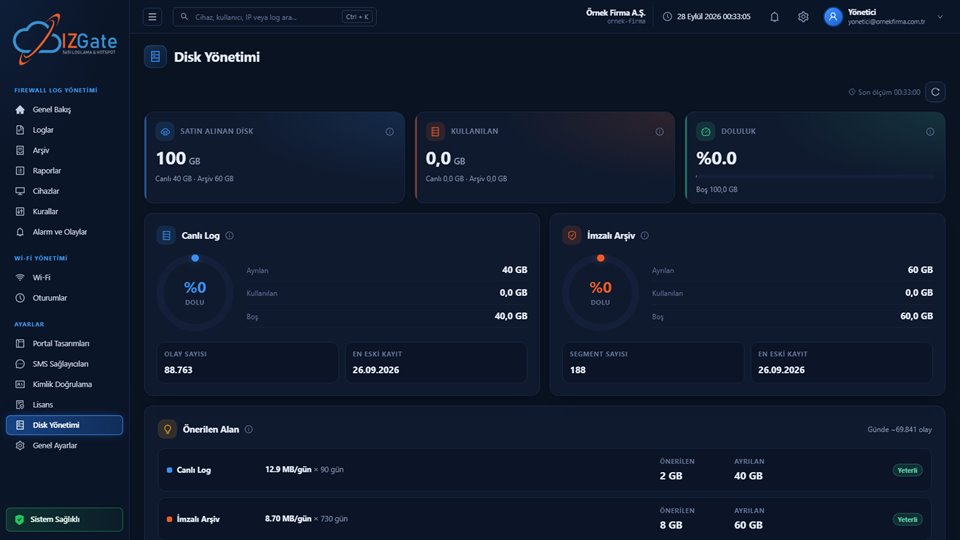
Quota/usage/fill-level gauges are shown as live-archive ring charts. The same data is also available as PDF/Excel/CSV through the Disk Usage Report, one of 17 ready-made reports across 8 categories on the panel's Reports page.
The value of a log archive is measured at the moment it's needed most: when a request comes in, when an incident is being investigated, or when planning capacity.
"Who was on this IP, on that date, at that time?" is answered in seconds with a signed record, filtered by time, IP and user.
After an incident, the past traffic of the device, user or destination involved is examined on the timeline; the unified Alerts and Events stream surfaces suspicious patterns.
Event volume and archive fill rate are tracked in Disk Management, so disk capacity and retention periods are tuned to real usage.
Most enterprise SIEM products use a distributed messaging system like Kafka to manage log streams. These systems are built to handle data from thousands of servers and carry their own separate operational overhead. Because izgate's target audience is enterprise networks with one or a handful of office firewalls, the design is deliberately kept simpler: incoming syslog lines go straight into a secure, disk-backed queue. This queue gives the same durability guarantee without standing up an extra service; even if the syslog collector crashes or the server restarts, lines that haven't been processed yet wait safely in the queue.
The log search layer uses the column-oriented ClickHouse database. This choice aims to deliver comparable search speed on the same hardware while using far less memory and disk; on a small or mid-sized server, even with millions of log lines a day, time/IP/user/MAC/port filters return results in milliseconds.
For a log record to carry evidentiary value under 5651, it must be possible to prove it hasn't changed since the moment it was produced. izgate achieves this with the following layers: every archive segment is compressed and hashed with SHA-256, carrying the digest of the previous segment to form a per-tenant chain; the segment is signed with an Ed25519 key unique to the installation; and finally, the digests of that day's not-yet-timestamped segments are combined into a Merkle root, which once a day receives a qualified timestamp from the Public Certification Authority (Kamu SM) via İzHost's central service. An automatic integrity check also runs every night. Verifying these layers together proves to a third party that no retroactive change has been made to the archive.
Live log storage is optimized for fast search and is usually kept for a shorter window; the signed archive, on the other hand, can be kept for a much longer period to meet the legal retention obligation. izgate lets you set these two periods completely independently from the panel; an event whose live retention has expired is removed from the fast search database, but its signed copy stays in the archive until its own retention period ends, and it can be restored to live from the archive page whenever needed.
Law No. 5651 and its related regulation require organizations that provide internet access to retain traffic records for a given period with their accuracy, integrity and confidentiality preserved. izgate's log collection, user matching and signed archiving mechanisms are designed to technically meet this principle; we recommend getting your legal counsel's view on exactly how the obligations apply to your organization. For more detail, see the 5651-compliant logging and Security and Compliance pages.
izgate accepts syslog records over UDP 5514, TCP 5515 for reliable delivery, and encrypted TLS 6514 if a certificate is configured on the firewall. The panel's "Log Shipping" screen generates ready-made configuration specific to your device.
No, not for devices that carry a serial number (FortiGate, Sophos, Palo Alto): device identity is the serial number, so logs keep going to the right device even if the address changes, and the new address is learned automatically from the first log. For devices without a serial (MikroTik, pfSense, OPNsense, generic syslog), the address must be defined in the panel; if the address matches but the serial doesn't, the event isn't written and a quarantine device is created.
No. Every incoming line is written to a secure disk queue first; a queued record is only removed once it's been safely written to both the search database and the signed archive. Lines not yet processed during an outage stay in the queue and continue processing after restart.
The Rules page currently works only with FortiGate and MikroTik: firewall policies are read and written (enable/disable/add/edit/delete), with hit counters and change history shown. Other drivers show "not supported"; Sophos and Palo Alto adapters are on the roadmap.
Yes. Log collection and signed archiving continue uninterrupted even on an unlicensed device; only that device's search, statistics, device metrics and guest portal screens go dark.
On guest Wi-Fi, the verified person gets a fixed alias code that's written to the firewall; on office Wi-Fi, the RADIUS session table matches by IP and time window. In both cases, the Live Logs screen resolves the code to the person.
Configure izgate Cloud based on your number of firewall devices and storage needs; no setup, get started in minutes. Call us with any questions.