When an action carried out over a business's internet line comes under review, the inquiry is directed first at the business that owns that line — because the external IP address is registered to the business. Who actually performed the action (employee, guest, or visitor) is not known at this early stage. Identity-matched access records — which person connected from which device, at what time, with which internal IP and NAT port — reveal who performed the action and remove your business from that uncertainty.
Why the question comes to the business first
The external (public) IP address your internet service provider assigns you is tied to your business through your subscription record. From the outside, the ten people in your office all appear to go online through the same IP; when an inquiry sees this IP, it finds your business as the counterpart. This works the same way for a customer at a café, a guest at a hotel, a subcontractor's worker at a factory, or staff in an office: the address visible from outside is always yours, never the individual's.
At this point you may be in one of two situations. Either your internal network has a record showing which device, which person, produced that outbound connection at that moment — or it doesn't. If the record exists, the question moves from you to the individual. If it doesn't, the question stays with your business.
The law doesn't distinguish employees from customers
The definitions article of Law No. 5651 draws the line on who carries this obligation using the term "public use provider," and this definition makes no distinction by user type:
"Toplu kullanım sağlayıcı: Kişilere belli bir yerde ve belli bir süre internet ortamı kullanım olanağı sağlayanı,"
"Public use provider: a person who provides others with the means to use the internet environment at a specific place for a specific period,"
Law No. 5651, Article 2/1-i — mevzuat.gov.tr — unofficial translation
The word "others" in this definition creates no difference between a customer, a guest, a student, or an employee. A business that provides its employees with internet access from its office network falls within this definition just as much as a hotel providing Wi-Fi to its guests. So the distinction some draw — "this only concerns guest Wi-Fi, not the internal office network" — does not exist in the text of the law.
Access records: an obligation placed on everyone
Article 7 of the Law places the obligation to keep access records on all public use providers, regardless of commercial purpose:
"Ticari amaçla olup olmadığına bakılmaksızın bütün internet toplu kullanım sağlayıcılar, konusu suç oluşturan içeriklere erişimin engellenmesi ve kullanıma ilişkin erişim kayıtlarının tutulması hususlarında yönetmelikle belirlenen tedbirleri almakla yükümlüdür."
"Regardless of whether they act for commercial purposes, all internet public use providers are obliged to take the measures set out by regulation regarding the blocking of access to content that constitutes a crime, and the keeping of access records relating to use."
Law No. 5651, Article 7/2 — mevzuat.gov.tr — unofficial translation
The critical distinction here is not "commercial purpose" but "providing public use." An office does not sell a commercial service by giving its employees internet access; but because it provides the means to use the internet, it still falls within the scope of keeping access records and taking measures to prevent access to criminal content. The operating-permit requirement and the administrative fine in Article 7/4, however, are set out only for businesses that provide public internet use for commercial purposes (internet cafés and similar venues that sell internet access for a fee); an office or a factory should not be confused with that specific sanction.
What an access record must actually contain
The Regulation on Internet Public Use Providers spells out the definition of "access records" field by field:
"Erişim kayıtları: Kendi iç ağlarında dağıtılan IP adres bilgilerini, kullanıma başlama ve bitiş zamanını ve bu IP adreslerini kullanan bilgisayarların tekil ağ cihaz numarasını (MAC adresi) gösteren bilgileri, hedef IP adresi, bir veya birden fazla IP adresinin portlar aracılığı ile kullanıcılara paylaştırılması yöntemi ile sunulan internet erişim hizmetinde kullanıcıya tahsis edilen gerçek IP ve port bilgilerini,"
"Access records: information showing the IP address information distributed within the provider's own internal networks, the start and end time of use, and the unique network device number (MAC address) of the computers using these IP addresses; the destination IP address; and, in an internet access service provided by sharing one or more IP addresses among users through ports, the actual IP and port information allocated to the user,"
Regulation on Internet Public Use Providers, Article 3/1-e — mevzuat.gov.tr — unofficial translation
In plain terms, these five fields say: which internal IP was given to whom/which device and when, that device's MAC address, where it connected to (destination IP), and — if multiple devices sit behind one shared external IP (NAT) — the actual external IP and port allocated to that device at that moment. izgate records exactly these five fields together — time, internal IP, MAC, destination IP, NAT IP:port — on every line, along with the user (the identity-verified person), session start/end, protocol, and device information.
What an "identity-matched record" means
All of the fields above operate at the IP and device level; on their own they don't answer "which person was behind this IP?" Identity matching means linking this technical record to a real person (or at least to a record you can trace back to in the panel). In izgate this link is established in one of two ways: the person has verified their identity through a login screen (portal, user account, AD/LDAP, RADIUS), or it is otherwise known (through assignment or a session record) that the person was using that device/internal IP at that time.
An employee with an account: the alias-code flow
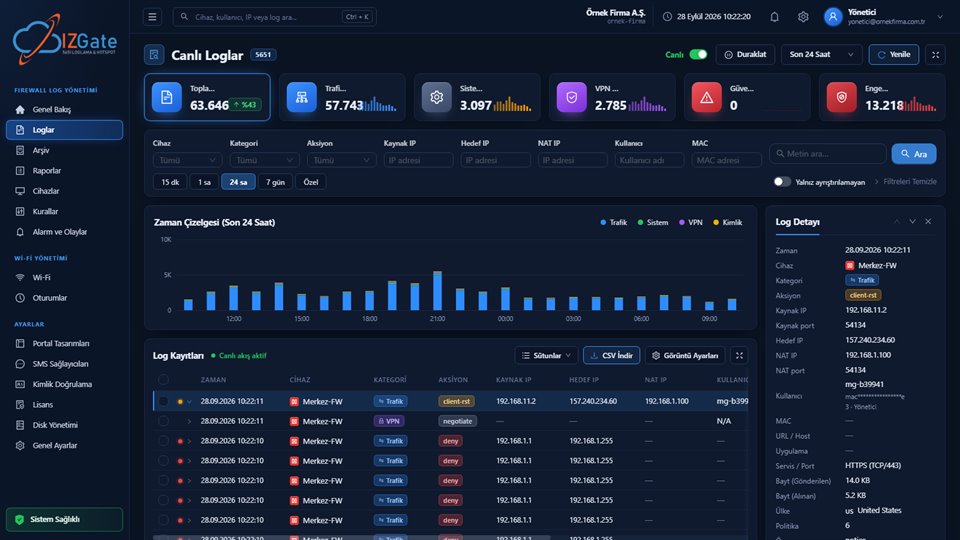
When an employee connects to the office Wi-Fi via RADIUS or logs in through a login screen with a user account, izgate verifies that identity and opens an authorization on the firewall under a fixed alias code (in the form mg-xxxxxx) for that person. It is this alias code that is written to the user= field of the firewall's and traffic logs — the employee's real name, email, or username is never written to the firewall at all. The mapping between the alias code and the real person is kept encrypted only within izgate, and is resolved only at the moment of lookup, on the authorized search screen. When a log line is clicked in the panel, this resolution happens automatically and the record is displayed together with the real person (name, masked phone/ID number, etc.).
Devices without a portal: session matching
Not every employee computer passes through a login screen daily; in many offices, desktop computers have a fixed internal IP and connect to the network directly. In this case izgate uses that internal IP's session at the time (the information on which user/device it was assigned to) for matching. For this to work reliably, the internal IP allocation (DHCP records or a fixed-assignment list) needs to be kept current and accurate — which lines up exactly with the Regulation's requirement to keep "the IP address information distributed within internal networks."
Why MAC verification matters
A MAC address is the hardware number that uniquely identifies a device at the network level. izgate reads this information not from a user's declaration but directly from the firewall's connection table at that moment; MAC-based features (such as device registration, "remember this device," or the registered-device list) are therefore only active when this verification can be performed. This matters for a record's evidentiary value: the answer to "which device" rests on the network's own observation, not on something the user stated.
Proving the record wasn't altered: the signed archive
Answering "who did it" is not enough — it must also be possible to show that the record was not altered afterward. In izgate, the archive — written to a separate disk at the same time as the live record — is linked together in segments that close every hour via a SHA-256 chain; each segment is signed with an Ed25519 key unique to your installation, and a qualified timestamp (from a provider such as Kamu SM) is obtained once a day. An automatic integrity check runs every night; if any break in the chain is detected, a critical alert is generated. This way, the record in your hands answers not only "who," but also "this record was not altered."
Retention is also your own setting
An identity-matched, integrity-proven record only protects your business as long as that record is still in your hands. If a request comes in months later and the record has been deleted, you can no longer prove anything. In izgate, the retention period is not a legislative constant but a setting you choose in the panel; under Law No. 5651 two years is generally recommended and set as the default, with live and archived records kept in parallel for that period.
Running out of disk space does not interrupt this: even if the disk fills up, records are not silently deleted — you receive a capacity warning from the panel, and the decision to expand storage is yours. This eliminates the "record accidentally deleted" scenario — your ability to show who performed an action continues uninterrupted for as long as you retain the records.
Real-world examples by industry
The same theme plays out with different roles in different businesses. The example below walks through an office scenario step by step:
A download that became the subject of a complaint file at the office appears to have come from the company's external IP address. The inquiry is directed at the company first.
At the relevant time, that internal IP is seen to be assigned to a staff member who logged in via RADIUS (alias code mg-7f21ab), with a MAC address matching a company laptop.
In the panel, the alias code is resolved to the real person; who performed the action becomes clear, and the matter proceeds through that individual without the business itself becoming the subject.
- Time
- 2026-10-03 14:22:07
- Internal IP
- 10.20.4.113
- MAC
- 3c:aa:4b:1e:90:02
- User
- mg-7f21ab → (resolved in the panel)
- Destination
- 203.0.113.44:443
- NAT
- 88.248.x.x:51342
- Device
- FG-OFIS-01
The same logic plays out with different roles in other industries, too:
- Café: A customer's SMS-verified guest session at a table is technically completely separate from the staff network the café's own cashier/server uses with a separate RADIUS account at the same time; when an inquiry arises, which network (guest or staff) was used is visible at a glance.
- Hotel: When front-desk staff grant access to a guest who checks in with a room number and a PMS lookup, the guest's session is recorded under their own alias code, while the front-desk computer's session is recorded under its own user account; front-desk staff approve the action without ever seeing the guest's identity.
- Factory: During a shift change, a subcontractor's worker connects to the network with a time-limited visitor code approved by security; the code is bound by a usage counter and an expiry date, access drops automatically when the shift ends, and the record for that window stays tied to that code.
- Hospital: A patient's visitor is verified by SMS on the guest network, while clinical staff are authorized on a separate network with their own corporate account; because the two records never mix, even in a sensitive setting the question "was this connection the patient's or the staff's?" can be answered instantly.
This is not a legal guarantee
An identity-matched record lets you show who performed an action; but it is not a guarantee of "certain acquittal" or "you won't be fined." The legal outcome of an event depends on its nature, the scope of the investigation, and the decision of the authority conducting the assessment. What izgate provides is a record whose accuracy and integrity can be proven — how that applies to your own situation is something we recommend discussing with your legal counsel.
Checklist
- Is every device or user on your office/staff network matched to an identity (account, RADIUS, AD/LDAP), or is a shared IP used without identification?
- Is your internal IP allocation record (which IP went to whom/which device, and when) up to date for fixed devices that don't go through a portal?
- Are MAC addresses verified from the firewall's own table, or only taken on declaration?
- Are your records protected by a hash chain, digital signature, and an independent timestamp?
- Are the guest network and the staff network kept separate?
- When a request arrives, can you export the relevant period in a signed, verifiable form?
Frequently asked questions
Can my business be held criminally liable for something an employee does online?
This depends on the nature of the event and legal assessment; neither izgate nor this page offers a legal guarantee. What is known is this: because the external IP address is registered to your business, an inquiry is directed at your business first. If you hold identity-matched access records, you can show which person carried out the action and clarify the matter; without records, that determination cannot be made at all. We recommend consulting your legal counsel for your specific situation.
Does the law distinguish between customers and employees?
No. Article 2/1-i of Law No. 5651 defines a "public use provider" as a party that provides people with the means to use the internet at a specific place; this definition does not distinguish between a customer, a guest, or an employee. Any business that provides internet access to its employees falls within this definition as well.
How are desktop computers without a portal login matched to a person?
If an employee logs in with an account (username, AD/LDAP, or RADIUS), izgate links that identity directly to the session. On fixed office devices without a separate login screen, the match is based on the session/assignment record of that internal IP address at that moment — which is why keeping the internal IP allocation record up to date matters.
Can a record be falsified by spoofing a MAC address?
izgate reads MAC address information not from your own declaration but from the firewall's actual connection table at that moment; MAC-based features are only active when this verification can be performed. Network security is nonetheless a holistic matter; we recommend evaluating with an awareness that MAC verification has technical limits.
What should I have ready when an authority requests records?
You can select the relevant date range and device from the Archive page and export it as a signed package; the package includes a README, a catalog, segment files, a manifest, and a timestamp token. For the procedure and scope of such requests, see the guide Responding to Authority Log Requests.
How long should I retain records?
In izgate, the retention period is a setting you choose in the panel; based on the legislative requirement, two years is generally recommended and set as the default. Records are not deleted even if the disk fills up — you receive a capacity warning instead. Your ability to show who carried out an action lasts as long as you retain the records.
This page is for information only; for the current text of the legislation, refer to the official source (mevzuat.gov.tr).
Related guides
Responding to Authority Log Requests
Steps for verifying scope, searching, and exporting a signed package when a request arrives.
PracticeLog Integrity: Hash Chains, Signatures, and Verification
How it's technically shown that a record was never altered afterward.
PracticeWhy Separate Your Guest and Staff Networks?
How mixed networks weaken accountability and security.