The safe path when an access-record request arrives from an authority is this: take the request in writing, clarify its scope (date range, IP/user/device), inform your legal counsel, and then verify the relevant period from Live Logs and the Archive before preparing it as a signed package. izgate's role is not to make the legal assessment of the request, but to produce accurate, integrity-proven data.
First steps when a request arrives
When a log/access-record request arrives, the first task is to understand who it came from, through what written document, and with what scope. If your business already has a designated point of contact for this process (a manager, legal counsel, or IT lead), the request should be routed to them. This guide does not decide which requests should be treated as valid, or through what procedure they should be answered — that is an assessment for your business's legal counsel. What izgate offers technically is the ability to quickly locate the relevant record once the request is clarified, and prepare it in a verified form.
In practice, this first step usually takes only a few minutes: whoever receives the request (front desk, security, a manager) forwards the document to the point of contact your business has designated; that contact calls legal counsel if needed. This brief wait does not delay the technical team from starting the log search — preparation can begin while the scope is being clarified, but you are expected to complete this approval step before handing data to anyone.
Verify the scope and time range
Before running a log search, check whether the request clearly states: which date/time range, which IP address or user, and which device/location (if you have more than one branch). Keeping the scope narrow and explicit both speeds up your search and ensures the data you share doesn't exceed the boundaries of the request. If the scope is unclear, it is reasonable to ask the requesting authority to clarify it.
A restaurant receives a written information request about an action taken from a specific IP address on a specific date; the date and time range are stated.
The business owner forwards the request to legal counsel, who confirms the scope (only the stated date/time).
The IT lead searches Live Logs and verifies only that date/time range; nothing outside the scope is exported.
Why these records are kept
The purpose of keeping access records is explicitly defined in the law:
"Ticari amaçla olup olmadığına bakılmaksızın bütün internet toplu kullanım sağlayıcılar, konusu suç oluşturan içeriklere erişimin engellenmesi ve kullanıma ilişkin erişim kayıtlarının tutulması hususlarında yönetmelikle belirlenen tedbirleri almakla yükümlüdür."
"Regardless of whether they act for commercial purposes, all internet public use providers are obliged to take the measures set out by regulation regarding the blocking of access to content that constitutes a crime, and the keeping of access records relating to use."
Law No. 5651, Article 7/2 — mevzuat.gov.tr — unofficial translation
The Regulation then spells out the content of these records in five fields: internal IP, start/end time, MAC, destination IP, and — where a shared IP (NAT) is involved — the actual IP/port information. When preparing a response to a request, these are exactly the fields you're looking for; izgate keeps all of them together on every traffic line.
Searching Live Logs: IP, time, NAT port
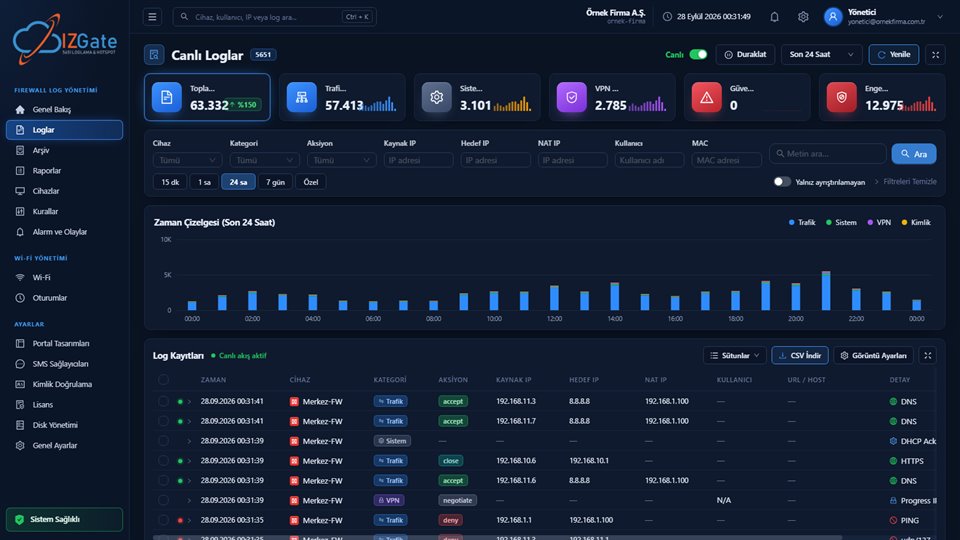
The Panel › Logs page offers a search that can be filtered to the scope of the request: date range, device, category, action, source/destination/NAT IP, user, MAC, and free text. When multiple people sit behind one shared external IP (NAT), combining the search with the external port — not just the external IP — narrows things down to a single line showing exactly which internal IP/person produced that connection at that moment. Clicking a line in the results displays every field the device sent, along with the user resolved to their real identity.
Integrity verification in the archive
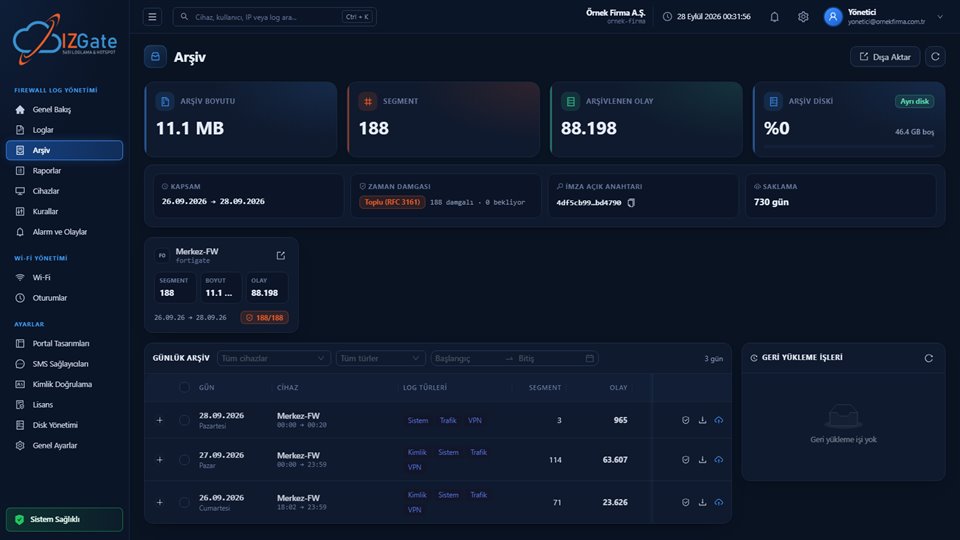
If the requested period falls outside the live window, we recommend locating the relevant segments on the Archive page and first verifying their integrity: the hash chain, digital signature, and timestamp are checked together, and the result is reported as either "chain intact" or exactly where the error lies. If needed, you can temporarily restore the segments to live and inspect them from the search screen; this does not alter the original archive file, it only creates a searchable copy.
The signed export package
Once the scope and period are clear, you can select the relevant range on the Archive page and export it as a single package. The package contains:
- README: A short text explaining how to verify the package.
- Catalog: The list of segments, chain order, and hash information.
- Segment files: The compressed raw log data.
- Manifest: The segment's hash, the previous segment's hash, and the digital signature.
- Timestamp token: Proof of time obtained from an independent timestamp server.
This package shows independently when the data existed and that it was not altered afterward. The decision of who the package is delivered to, in response to which written request, and with what scope belongs to your business and your legal counsel; izgate does not make that decision — it only produces accurate data.
If you have more than one branch or device
A request may concern one, or all, of your branches. In izgate, each branch's firewall device is added to the panel with its own record; the Live Logs search can be narrowed to the branch you need with the device filter. This lets you select the branch the request actually covers and avoid needlessly including other branches' records in the package. In an on-premises deployment all data sits on your own single server; in a cloud deployment it sits in your tenant's single account — businesses cannot see each other's data.
Keep the process documented
We recommend noting, on your own side, the date you received the request, who it came from, the scope you responded with, and which period the exported package covered. This record lets you show, later on, "when, to whom, what was given," and helps keep the process transparent. A simple table (date, requester, scope, delivery date) is enough for most businesses; what matters is keeping this note organized and accessible.
Common mistakes
Exporting a wide date range as-is in response to a request, without first clarifying the scope.
Sharing more data than necessary, and a response that exceeds the boundaries of the request.
Clarify the scope in writing, then prepare only that range, verified and signed.
- Exporting from the archive without verifying it: A file shared without checking the segment's integrity first may not carry proof of integrity when later questioned — don't skip the verification step.
- Not documenting the process: If you don't keep a note of which request was answered, when, and with what scope, reconstructing the process later becomes difficult.
- Leaving legal counsel out of the process: Whether a request is valid and how it should be answered is a legal, not a technical, decision; we recommend making that call together with your counsel.
Frequently asked questions
How do I know a request genuinely comes from an authorized authority?
This is a legal assessment that should be made by your business's authorized representative or legal counsel. Neither izgate nor this page decides which requests count as valid; what we can do technically is prepare accurate, signed data once the request is clarified.
Can I hand over data immediately if a request arrives verbally or by email?
We recommend making this decision together with your legal counsel on your business's behalf. For a traceable process, it is generally a safe practice to get the request in writing, clarify its scope, and keep a record of it.
What information can I search by in Live Logs?
The Panel › Logs page lets you search with filters for date range, device, category, action, source/destination/NAT IP, user, MAC, and free text; results are listed with a timeline and facets, and the record detail shows every field the device sent.
What do I do if the requested period is in the archive?
From the Archive page you can restore the relevant segments to live, or export them directly as a signed package. Verifying the segment's integrity with one click before exporting confirms that the package is sound in terms of chain and signature.
What does the exported package prove?
The package consists of a README, a catalog, segment files, a manifest, and a timestamp token. Together these components show when the data existed and that it was not altered afterward; the legal assessment of the request still belongs to the relevant authority and your legal counsel.
How do I narrow down a request if I have multiple branches?
Each branch's firewall device is added to the panel with its own record; the search in Live Logs can be narrowed to the branch you need with the device filter. This lets you select the branch the request actually covers and avoid needlessly including other branches' records in the package.
This page is for information only; for the current text of the legislation, refer to the official source (mevzuat.gov.tr).
Related guides
Employee Internet Use: Who Is Responsible?
The external IP is registered to the business; an identity-matched record protects it.
PracticeLog Integrity: Hash Chains, Signatures, and Verification
The technical proof mechanism behind the package you export.
PracticeWhat Is a Hotspot and Captive Portal, and How Do They Work?
How guest connections are matched to identities.