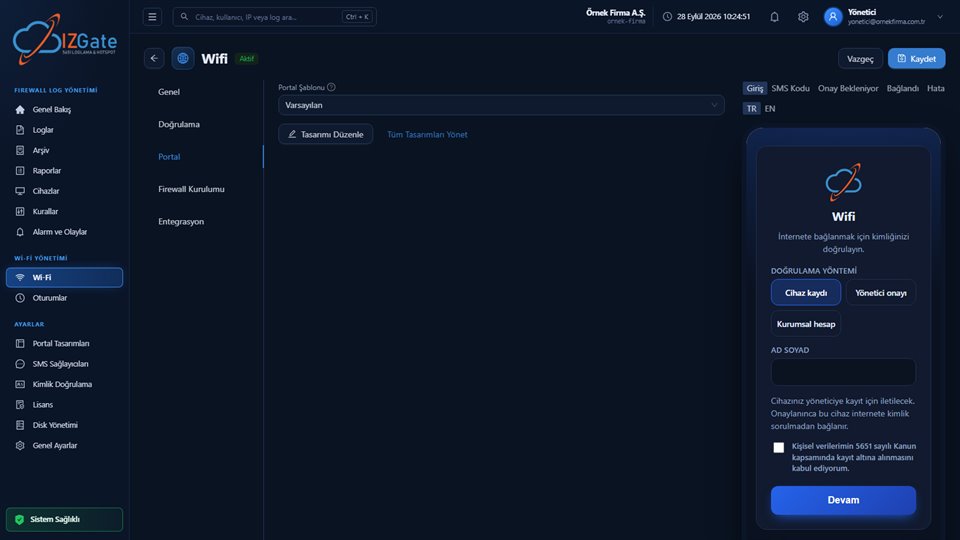
A hotspot is the wireless network itself that your guests connect to with a phone or laptop. A captive portal is the login screen that automatically greets any device joining that network and blocks internet access until identity verification and the KVKK consent are complete. Once verification finishes, a personal access is opened on your firewall and internet access begins.
What a hotspot is
In everyday usage, the term "hotspot" describes the wireless internet network a business offers its guests. Technically, this is an SSID broadcast by your access points; the radio and network side runs entirely on your own hardware (access point, switch, firewall). izgate does not touch this radio layer — what it provides is the layer that verifies the identity of whoever connects to this network and opens access on the firewall.
This distinction matters in practice: your hotspot's signal strength, coverage area, and how many devices it can carry at once depend on your access points' hardware capacity; izgate neither increases nor decreases that capacity. izgate's contribution is knowing who every person connecting to this network is, and recording that under Law No. 5651.
What a captive portal is
A captive portal is literally a "captive" or "capturing" portal: a device joining the network cannot reach any address it requests until verification is complete — every request is automatically redirected to the portal page. This redirect happens at the firewall or access-point level; the device's browser typically opens by itself and takes the user to the login screen. In izgate, every guest network operates with its own unique portal address; the firewall is configured to redirect all incoming connections to this address until verification is complete.
From the guest's point of view this process is usually invisible: they connect their phone, enter the requested information on the page that opens, and are online within a few seconds. What happens behind the scenes is a short handoff between three separate systems: the access point/firewall, the izgate portal, and the firewall's own user-authorization mechanism.
The flow: redirect, verify, authorize
Four steps take a guest from connecting to being online:
Connect
The guest connects to the hotspot; their device is automatically redirected to the portal address.
Verify
Identity is verified using the method you chose (SMS, ID number, visitor code, administrator approval…), and KVKK consent is obtained.
Hand off
izgate opens a temporary user on the firewall under a fixed alias code for that person; the raw identity is never written to the firewall.
Close when time is up
When the session duration expires, izgate deletes the temporary user via the API; the record remains in the signed archive.
The critical point of this flow is that the handoff only ever happens to the internal network (private addresses); identity information is never sent to any public internet address.
How it works technically on FortiGate
If you use FortiGate, izgate connects to your device over REST API using a configured set of access credentials; once verification is complete, FortiGate's own captive-portal authorization mechanism is triggered and internet access is opened for the guest. A device is registered with izgate only after it connects with the access credentials your company provided and its serial number is read directly from the device (a verified device); logs from an unverified source are never written to any company's account, so a connection is never made to the wrong or an unauthorized device.
How it works technically on MikroTik
On MikroTik, izgate connects to your device running RouterOS 7 over SSH and REST API, and opens access for the guest once verification is complete. A device-specific secret signature is additionally added to MikroTik logs; this allows verifying which log came from which device, and guarantees that logs from an unverified source are never written to any company's account.
Which devices are supported
For new device registration, izgate supports four firewall families: FortiGate (via REST API), MikroTik (RouterOS 7, via SSH and REST API), pfSense, and OPNsense (via SSH). What these four have in common is that izgate can only connect to the device using the access credentials your company provided, and its serial number is read directly from the device; no device is registered until its serial number has been read and verified. If you have more than one branch or location, each is added to the panel with its own device record, and hotspot settings (verification method, portal design, session duration) are configured independently per network. Even if your branches use different firewall brands, you can manage all your hotspot networks from a single panel and keep their records in the same signed archive.
SMS identification in publicly accessible areas
The Regulation defines a separate obligation for public use providers that offer internet access in publicly accessible areas:
"Kamuya açık alanlarda internet erişimi sağlayan toplu kullanım sağlayıcılar, kısa mesaj servisi (sms) ve benzeri yöntemlerle kullanıcıları tanımlayacak sistemleri kurmak."
"Public use providers offering internet access in publicly accessible areas shall set up systems that identify users through short message service (SMS) or similar methods."
Regulation on Internet Public Use Providers, Article 4/1-c — mevzuat.gov.tr — unofficial translation
The wording here says "SMS or similar methods" — meaning a method capable of identifying the user is required, not SMS specifically. In izgate, alternatives alongside SMS — ID-number verification, visitor codes, administrator approval, registered devices, and institutional-service lookups — can serve the same purpose (identifying the user). We recommend consulting your legal counsel when assessing which method is appropriate for the kind of space your business operates (public/non-public).
Session duration and automatic closure
Each network has a session duration defined in minutes. When it expires, izgate automatically deletes the temporary user on the firewall via the API; the guest's access closes immediately. If "remember this device" is enabled, the same MAC address returning within the period you defined gets a new authorization opened under the same person without being asked for the code/identity again — but this, too, is reflected in izgate's session records; identity never leaves the system.
Example: a café network
A customer sitting at a table selects the café's network from their phone's Wi-Fi list; their browser is automatically redirected to the portal.
They enter the code received by SMS and accept the KVKK notice; verification takes a few seconds.
izgate opens a temporary user on the firewall under a fixed alias code; the customer goes online, and access closes automatically once the session time is up.
Checklist
- Does your guest network's captive portal block access to every address until verification is complete?
- Is your verification method (SMS, ID number, visitor code, etc.) a good fit for the kind of space you operate?
- Is your firewall registered with izgate as a device verified by its serial number?
- Are your session duration and "remember this device" settings configured to suit your traffic?
- Does your portal design match your brand, and is your KVKK notice up to date?
Frequently asked questions
Are a hotspot and a captive portal the same thing?
No. A hotspot is the wireless network itself (the Wi-Fi guests connect to). A captive portal is the login page that greets a device connecting to that network and blocks internet access until identity verification is complete. izgate handles the captive portal side; the hotspot's radio/SSID side stays on your access points or your firewall.
How is a guest prevented from reaching the internet without seeing the portal?
When a device connects to the network, the firewall/access point redirects all traffic to the portal address until verification is complete. The device's browser is automatically redirected to izgate's portal address; no other address is opened until verification finishes.
How does authorization actually work technically on FortiGate and MikroTik?
On FortiGate, izgate connects via REST API using access credentials configured on your device and triggers FortiGate's own captive-portal authorization mechanism. On MikroTik, the connection to a device running RouterOS 7 is made over SSH and REST API. In both cases, the device is registered only after izgate connects with the access credentials your company provided and reads its serial number; identity information is never sent out.
Is SMS verification mandatory in public spaces?
Article 4/1-c of the Regulation requires public use providers that offer internet access in publicly accessible areas to set up systems identifying users through SMS or similar methods. In izgate, SMS is not the only option; methods such as ID verification, visitor codes, or administrator approval can serve the same purpose. We recommend assessing which method suits your premises with your legal counsel.
How is a guest's access closed when the session time runs out?
When the session duration you've defined for the network expires, izgate automatically deletes the temporary user on the firewall via the API; access closes immediately and the record remains in the signed archive.
Which firewall brands does it work with?
New device registration supports FortiGate (via REST API), MikroTik (RouterOS 7, via SSH and REST API), pfSense, and OPNsense (via SSH). A device is registered only after it connects using the access credentials your company provided and its serial number is read; logs from an unverified source are never written to any company's account.
This page is for information only; for the current text of the legislation, refer to the official source (mevzuat.gov.tr).
Related guides
Guest Verification: SMS, ID Number, or Visitor Code?
A scenario-based comparison of verification methods.
PracticeWhy Separate Your Guest and Staff Networks?
The risks of mixing a hotspot with the office network.
PracticeHow Printers, Robots, and IoT Devices Get Past the Portal
A solution for devices that cannot display the captive-portal screen.