A captive portal expects a device joining the network to open a browser, display the login page, and have the user perform an action (entering a code, giving approval). Printers, robot vacuums, smart TVs, and most IoT sensors have no such interface; these devices can never reach the portal page and therefore can't join the network. izgate lists these devices in a separate panel view and lets you register them with one click via their MAC address.
Why these devices can't see the portal
When a guest's phone connects to the network, the operating system automatically opens a browser window and redirects the user to the portal. Printers, robot vacuums, and similar devices have no such operating-system behavior or browser; the device simply gets an IP address and tries to communicate directly. The captive portal tries to capture and redirect this traffic too, but because the device has no interface to respond with, verification can never complete and the device can't get online.
This situation is usually noticed right after setup: a newly connected printer or smart TV keeps showing "no internet," while a phone on the same network connects without issue. The problem isn't the device — it's simply stuck because it can't provide the interaction the portal expects. The solution in this guide is not to try to force these devices through the portal, but to add them to a verified exception list.
The "Unrecognized Devices" view
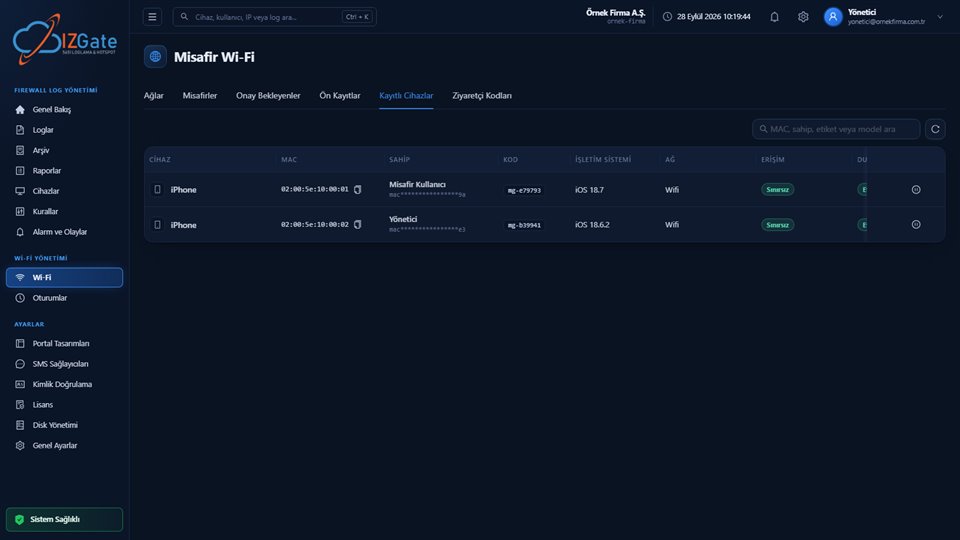
izgate collects devices that try to join the network but never complete portal verification into a panel list called "Unrecognized Devices." This list shows you — along with MAC address, time first seen, and the network it connected to — which devices couldn't get past the portal, so you don't have to guess which device it is.
This list also works like an inventory tool: every printer, camera, or smart device you add over time shows up here the first moment it's seen. Checked regularly, it lets you track how many unidentified devices have connected to your network and what they are — making it easier to spot an unauthorized or forgotten device.
One-click registration and automatic exemption
You can register a device on the list with a single click; this marks the device's MAC address as a "registered device." If you use FortiGate, a portal exemption is automatically applied for the device at the moment of registration — it can then access the network directly without ever being redirected to the portal page again. Registration can be reversed from the panel at any time; removing the device from the list also removes the exemption. On other supported firewall brands, the same registration keeps the device's MAC address in a verified state; automatic application of the portal exemption is currently specific to FortiGate.
Why MAC verification matters
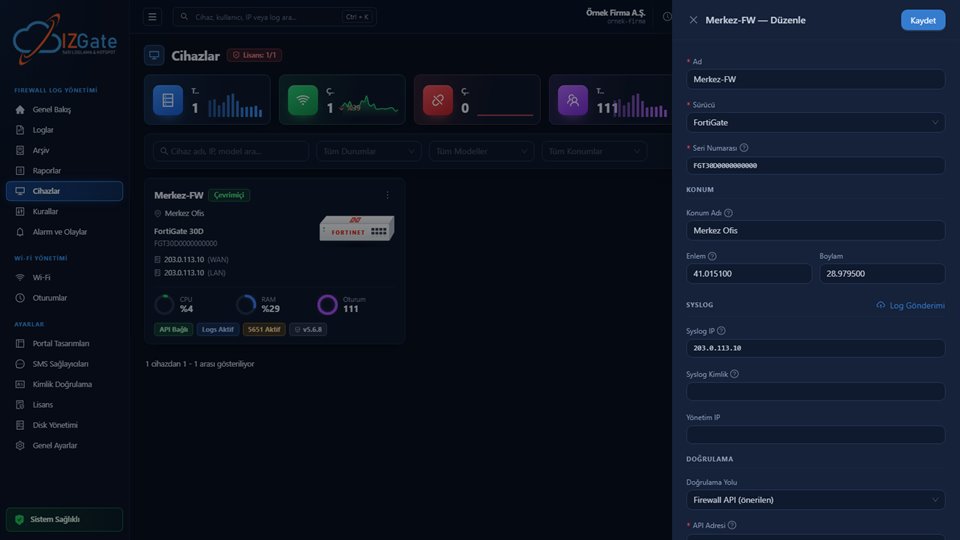
During registration, izgate reads MAC information not from a user's declaration but directly from the firewall's actual connection table at that moment. This prevents a fake record from being created with a randomly typed MAC address; a registration is only valid for a device the firewall has actually seen and that can be verified.
This verification guarantees that every line in the "Unrecognized Devices" list genuinely belongs to a device actually seen on your network — no one can manually add a MAC address that doesn't exist. The same verification also means that every entry in the registered-device list remains genuinely verifiable; this is the same security principle used elsewhere for other MAC-based features (such as "remember this device" or the "registered device" methods on the guest side).
Who the traffic is tied to after registration
Once a printer or IoT device is registered, its traffic doesn't stay fully anonymous: whoever created the record, or the device record you defined, is linked to that MAC address. This means the question "was this device on the network, and whose record was its traffic tied to" can keep being answered in the signed archive, following the same logic as the other access records.
This matters for accountability: traffic produced by an IoT device never falls into a "nobody knows" state. Whoever registered the device (usually an IT lead or front-desk staff) takes on responsibility for that device; keeping the record updated when the device is replaced or decommissioned keeps this chain current.
Example: registering a hotel room TV
A newly installed smart TV in a room tries to join the guest network but can't get online because it can't display the portal screen.
The TV shows up in the panel's "Unrecognized Devices" list with its MAC address and time first seen; the IT lead registers it with one click as "Room 204 TV."
The TV connects to the network without ever being redirected to the portal page again; the traffic it generates stays tied to the "Room 204 TV" record and the IT lead who registered it.
Examples by industry
Hotel: Smart TVs in rooms and the receipt printer at the front desk gain permanent access with a single registration, without needing to reconnect to the guest network every day. When a new room opens or a TV is replaced, front-desk or technical staff can register the new device just as easily from the Unrecognized Devices list.
Factory: IoT sensors and barcode scanners on the production line connect to the network without needing portal verification, but with MAC-based, traceable access. As the production line grows, every new sensor added goes through the same one-click registration flow; periodically reviewing the Unrecognized Devices list is recommended to keep the inventory current.
Office: A network printer and scanner, once registered on the staff network, work without being asked for identity again; the record of the IT lead who created it stays linked to the device. Removing the record from the registered-device list when a device is no longer in use keeps the list aligned with your actual inventory.
Checklist
- Do you check the Unrecognized Devices list regularly?
- Have your printers, IoT devices, and TVs been registered with one click?
- Is the registered-device list kept current (are unused devices removed)?
- If you use FortiGate, have you confirmed the portal exemption is applied correctly?
- Is it known who registered each registered device, and why?
- Are devices no longer in use removed from the registered-device list on a regular basis?
Frequently asked questions
Why can't a printer or a robot vacuum get through the captive portal?
A captive portal requires the device to open a browser, display the login page, and have the user perform an action. Most printers, robot vacuums, IoT sensors, and smart TVs have neither a browser nor this kind of interaction; so they never reach the portal page and can never join the network.
What does the "Unrecognized Devices" view do?
izgate lists devices that try to join the network but never complete portal verification in a panel view called "Unrecognized Devices." From there you can register a device with a single click, and automatically apply a portal exemption for that device on FortiGate.
After registration, who does this device's traffic appear tied to?
It's tracked under the person who registered it, or under the device record you defined; the traffic doesn't stay fully anonymous. Because the device is identified by its MAC address, that MAC's traffic record is kept together with your other access records in the signed archive.
Is a MAC address good enough verification for registration?
izgate reads MAC information not from a user's declaration but from the firewall's actual connection table at that moment; MAC-based registration is only active when this verification can be performed. This prevents a fake record from being created with a randomly typed MAC address.
Can I later disable access for these devices?
Yes. Access for any device on the Registered Devices list can be turned off at any time with a single click from the panel; disabling it also removes the exemption/authorization on the firewall at the same time.
Can I see who registered a device later on?
The registration is linked to whoever created it, or to the device record you defined; this information can be seen in the registered-device list in the panel. This way an IoT device's traffic is never left completely without an identity. Each branch's devices appear in their own Unrecognized Devices list; you identify a new branch's printer, TV, or IoT device through the same one-click registration flow, and existing branches' records are unaffected.
This page is for information only; for the current text of the legislation, refer to the official source (mevzuat.gov.tr).
Related guides
What Is a Hotspot and Captive Portal, and How Do They Work?
The portal's overall redirect and verification flow.
PracticeGuest Verification: SMS or ID Number?
A comparison of verification methods for human users.
PracticeWhy Separate Your Guest and Staff Networks?
Which network IoT devices should be kept on.