Why internet on site is the business's responsibility
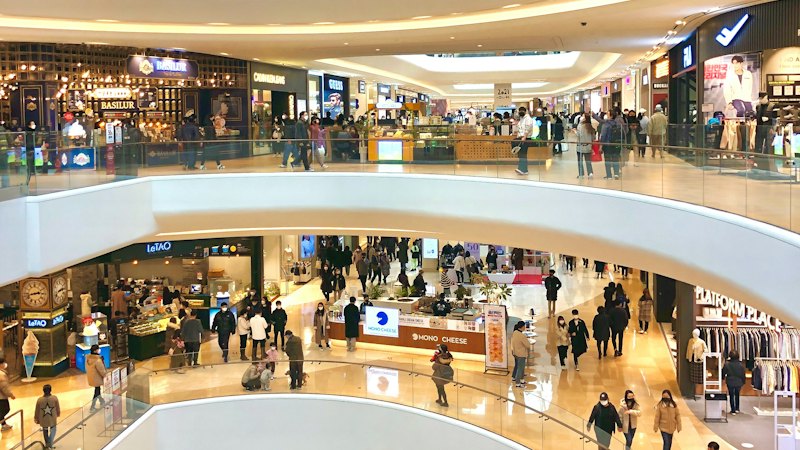
At a factory, warehouse, or construction site, the internet line serves a far more varied crowd than an administrative office. Shift workers may use the same stations and the same handheld terminals at different hours of the day. Technicians and drivers from contractor firms doing maintenance, installation, or haulage connect with their own phones or company devices. Visitors coming for an audit, a supplier visit, or a delivery want short-term access. Alongside all this, barcode scanners, handheld terminals, industrial printers, and sensors connected to the production line also pass through the same network.
To the outside world, this site has a single identity: the internet line registered in the business's name. When a transaction performed by a staff member on shift or a contractor on site is questioned, the first question goes to the business — because the visible address is the business's. With shift changes, temporary contractor badges, and a large number of shared devices all at once, answering "who was using that device at that moment" without a record is nearly impossible.
An identity-matched access record sorts this crowd out one by one: which user, on which shift, from which MAC-addressed device, with which internal IP, accessed what, can all be seen separately. This lets the business clarify an incident on its own site.
On production sites, this need keeps renewing itself: contractor firms change project by project, seasonal or shift-based staff turn over frequently, and a construction site's crew can change completely after a given phase. When an equipment failure, a security breach, or a supplier dispute is investigated, being able to answer retrospectively "whose device was active on site that day" is less a one-off inquiry than part of the site's everyday management.
Warehouses and construction sites may have multiple entry points, container offices, or a temporary site office instead of a single administrative building; each may have a different access point. Without a centralized logging system, this scattered layout leads to fragmented access information: one access point's log might be kept while another's isn't. izgate removes this fragmentation by monitoring, from a single point, the firewall that all the access points on site are connected to.
Delivery and logistics traffic is also part of this picture: drivers usually enter the site briefly, and may connect to a warehouse management system with their phone or a handheld terminal during loading/unloading. Identity-matching these short-lived connections just like permanent staff's lets a dispute during a delivery (a lost shipment, a damaged-goods report) be linked to which driver was on site at that moment.
Legal framework: the scope of access records
The definition in Law No. 5651 makes no distinction between a production site, a warehouse, or a construction site; any business that provides internet to its staff or visitors falls within scope:
"Toplu kullanım sağlayıcı: Kişilere belli bir yerde ve belli bir süre internet ortamı kullanım olanağı sağlayanı,"
"Public use provider: a person who provides individuals with the means to use the internet at a specific place for a specific period of time,"
Law No. 5651, Article 2/1-i — unofficial translation — mevzuat.gov.tr
The content of the access records that must be kept is also explicitly defined in the Regulation; this definition shows exactly what needs to be recorded in a crowded environment with shared devices:
"Kendi iç ağlarında dağıtılan IP adres bilgilerini, kullanıma başlama ve bitiş zamanını ve bu IP adreslerini kullanan bilgisayarların tekil ağ cihaz numarasını (MAC adresi) gösteren bilgileri, hedef IP adresi, bir veya birden fazla IP adresinin portlar aracılığı ile kullanıcılara paylaştırılması yöntemi ile sunulan internet erişim hizmetinde kullanıcıya tahsis edilen gerçek IP ve port bilgilerini,"
"Information showing the IP address information distributed on their own internal networks, the start and end time of use, and the unique network device number (MAC address) of the computers using these IP addresses, the destination IP address, and, for internet access service provided by sharing one or more IP addresses among users via ports, the actual IP and port information allocated to the user,"
Regulation on Internet Public Use Providers (2017), Article 3/1-e — unofficial translation — mevzuat.gov.tr
The same regulation also requires all public use providers to use a content filtering system (Article 4/1-a); on site, that filtering is applied by your firewall's own web filter, and izgate only collects the blocking and access records that filtering produces and matches them to the device and user. This is not a legal guarantee; the accurate statement is that you can document who performed a transaction on your site and respond fully to a request from the competent authorities. For the detailed framework, see the Regulation on Internet Public Use Providers and the What Are Access Records? guide.
A realistic scenario
The example below shows how an identity-matched record works in practice on a production site.
During the night shift, the factory's outbound (NAT) IP address is reported to have accessed a file-sharing site. To the outside world this address is your factory's; it doesn't say who connected.
The shift supervisor filters that time window in the panel by MAC address; the internal IP, device, and the user who logged in during that shift appear automatically matched.
The signed record documents that the access came from the phone of a contractor firm's technician on site for maintenance; the business clarifies the situation by showing who performed it.
- Time
- 2026-09-02 03:14:52
- Internal IP
- 10.40.12.77
- MAC
- B8:27:EB:4F:91:0C
- User
- mg-6c21a4 → Contractor technician (Maintenance Firm X)
- Destination
- 91.108.56.14:443
- NAT IP:Port
- 88.247.19.3:52110
- Device
- MikroTik-Site-Warehouse3
The same method can be used retrospectively to document which shift an equipment failure started on, which device a security breach originated from, or what resources a contractor firm accessed on site; finding the record requires no extra tool or external request.
What izgate does on this site
izgate separately recognizes shift staff, contractors, visitors, and IoT devices that can't pass through the portal, and identity-matches and signs the access of each. The capabilities below work together from the moment of setup.
- Separate login for shift workers, contractors, and visitorsStaff connect from the corporate network; contractors and visitors connect from the guest network with a visitor code, SMS verification, or administrator approval; access records never mix together.
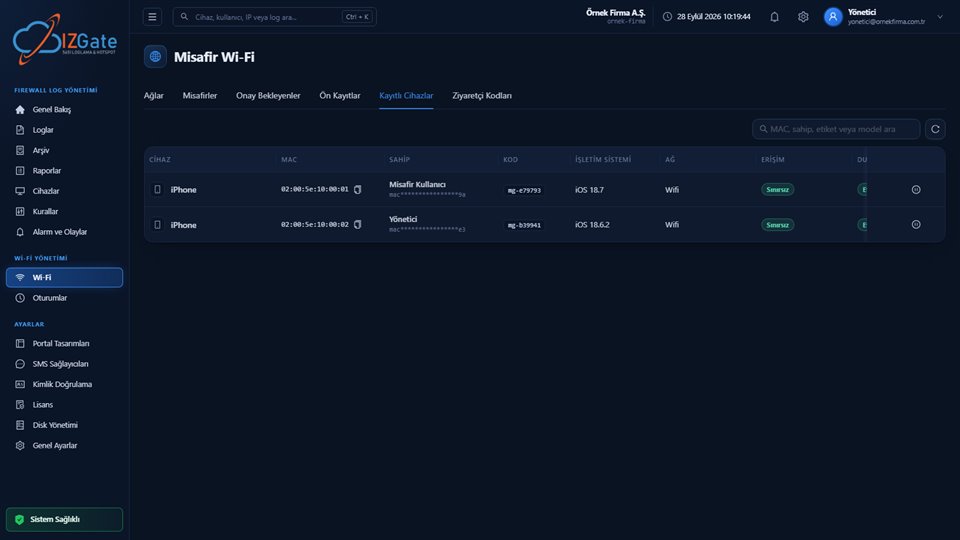
- Unrecognized DevicesDevices that can't display a login screen — handheld terminals, barcode scanners, or industrial printers — appear in the "Unrecognized Devices" list in the panel; they're registered with a single click, and a portal exemption is defined automatically on the FortiGate.
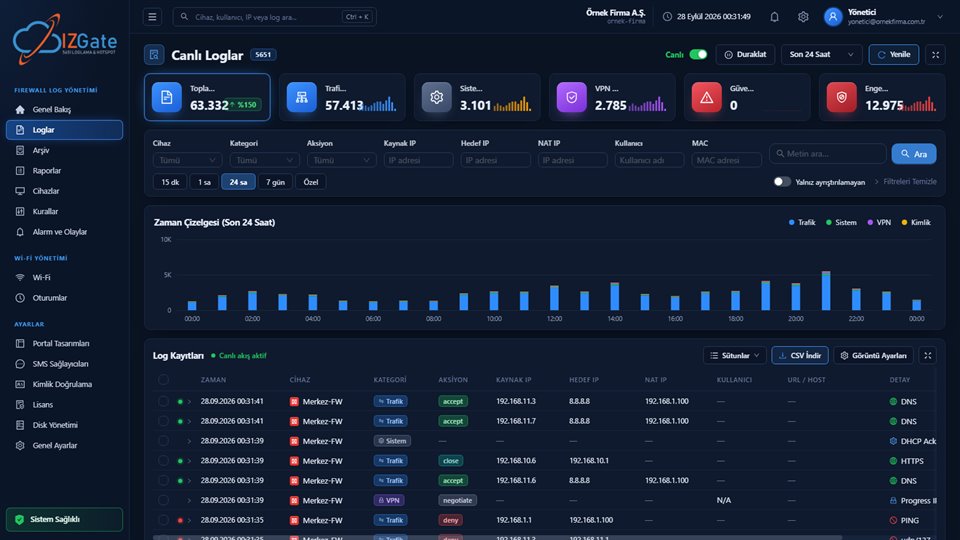
- Identity-matched access recordsEach line keeps time, internal IP, destination IP/port, NAT IP/port, MAC address, and user together; records can be searched by shift or device.
- RulesThe ability to view FortiGate and MikroTik firewall rules, turn them on/off, and track them with a change history.
- AlertsA device going offline/coming online, an unauthorized device connection, and rule changes are reported instantly.
- Signed archiveWritten to a separate disk at the same time as the live data, protected by a SHA-256 chain and an Ed25519 signature, with a qualified timestamp taken once a day.
How it's set up
Choose a deployment model
izgate Cloud for multiple sites; if you prefer a single on-premises server, logs and archive are set up on separate disks.
Connect your firewall
Your FortiGate (REST API), MikroTik (RouterOS 7, SSH/REST API), pfSense, or OPNsense device is registered after being verified against its serial number.
Define networks and device exemptions
Separate the staff and guest networks, and register devices that can't pass the portal from the Unrecognized Devices list with a single click.
Complete alert and archive settings
Configure device offline/online and unauthorized-connection alerts, and the retention period for the live and archive disks, from the panel.
Compliance checklist
- Is a separate login method defined for shift staff, contractors, and visitors?
- Are IoT devices that can't pass the portal (handheld terminals, printers, scanners) registered?
- Does every access record keep internal IP, MAC, user, destination, and NAT port together?
- Are multiple sites or construction sites monitored from a single panel?
- Are live and archive records kept on separate disks?
- Do you get an alert when a device goes offline?
- Is a contractor firm's access on site limited in duration and scope?
- Is the integrity of the archive records (hash chain + signature + timestamp) verified regularly?
This list is not a one-time setup check; it is a living checkpoint you should revisit as your site grows or as your contractor/shift structure changes.
Frequently asked questions
How do devices like barcode scanners and handheld terminals connect to Wi-Fi?
These devices usually can't display a login screen, so they can't pass through the captive portal. In the izgate panel, these devices show up in the "Unrecognized Devices" list; they're registered with a single click, and a portal exemption is defined automatically on the FortiGate.
Should shift workers and contractors be kept on the same network?
No. Shift workers should connect from the staff network with their corporate identity, while contractors and visitors should connect from the guest network with a visitor code or SMS verification; this separation keeps both access and records apart.
Does izgate work if there's no fixed infrastructure on site or at a construction site?
izgate collects the logs produced by your FortiGate, MikroTik, pfSense, or OPNsense device and identity-matches them. The device can be managed from the cloud panel or an on-premises deployment; the deployment model is chosen based on site conditions.
Can we later trace an access made from a device during the night shift?
Yes. Every access record is kept together with time, internal IP, MAC address, user, destination, and NAT port information; the relevant session can be found by filtering Live Logs by date and device.
Is the log for IoT devices on the production line kept separately from other records?
No, it's written to the same signed archive; but since it's tagged with device, user, and MAC information, it can easily be filtered out in searches.
If we have more than one factory or site, do we manage them from a single panel?
Yes. Each location's firewall device is added to the panel with its own record; search, alerts, and archive export are filtered by device or location and managed from a single panel.
Does a contractor's technician have to register again every time they come on site?
No, it depends on the registered device duration. An administrator-approved "remember device" duration can be defined; the same device returning before that duration expires connects without asking for approval again, and re-verification is requested once the duration has expired.
Is content filtering (blocking websites) done by izgate?
No. Content filtering is applied by your firewall's own web filter; izgate collects the blocking and access records produced by that filtering, matches them to the device and user, and reports on them.
If there are multiple access points on site, do the records merge together?
Yes. As long as all access points are managed through the same firewall, they are written to a single, centralized record and a single panel, together with information on which access point the connection came from; you don't need to collect logs separately per access point.
This page is for information only; for the current text of the legislation, refer to the official source (mevzuat.gov.tr).