Short answer: When multiple users share the same public IP address through NAT (Network Address Translation), the IP address and timestamp alone don't show which of the dozens of users behind that IP performed a given action at that moment. The Regulation therefore requires that the real IP and port assigned to the user in port-shared access also be included in the access record; without this information, identifying a single user is usually impossible.
What are NAT and ports, and why do they cause confusion?
Most small and medium-sized businesses' internet lines go out through a single public IP address; this IP is assigned to you by your carrier and, viewed from outside, is your business's identity. Every device on your internal network operates with its own private (internal) IP address; your firewall "NATs" (Network Address Translation) these internal IPs into that single public IP. To tell apart different connections leaving from the same public IP at the same time, the firewall assigns each connection a separate source port number — this port number is, viewed from outside, the single piece of information that identifies which device and which session on the internal network a given "public IP + port" pair belongs to.
With some carriers this sharing goes a step further: with CGNAT (carrier-grade NAT), multiple customers can share the same public IP. In either case the result is the same: a public IP on its own doesn't point to one person, but to a crowd of people sharing that IP.
What does the Regulation say?
The Regulation on Internet Public Use Providers specifically addresses this port-shared situation when defining "access records," and explicitly states that the real IP and port information assigned to the user is also part of the record:
"Kendi iç ağlarında dağıtılan IP adres bilgilerini, kullanıma başlama ve bitiş zamanını ve bu IP adreslerini kullanan bilgisayarların tekil ağ cihaz numarasını (MAC adresi) gösteren bilgileri, hedef IP adresi, bir veya birden fazla IP adresinin portlar aracılığı ile kullanıcılara paylaştırılması yöntemi ile sunulan internet erişim hizmetinde kullanıcıya tahsis edilen gerçek IP ve port bilgilerini,"
"Information showing the IP addresses distributed on their internal networks, the start and end time of use, and the unique network device number (MAC address) of the computers using those IP addresses; the destination IP address; and, for internet access service provided by sharing one or more IP addresses among users via ports, the real IP and port information assigned to the user."
Regulation on Internet Public Use Providers, Art. 3/1-e (definition of "access records") — unofficial translation — mevzuat.gov.tr
Law No. 5651's definitions article confirms the same logic for "traffic information," counting source and destination port information as a separate element alongside the IP address:
"Trafik bilgisi: Taraflara ilişkin IP adresi, kaynak ve hedef port bilgisi, verilen hizmetin başlama ve bitiş zamanı, yararlanılan hizmetin türü, aktarılan veri miktarı ve varsa abone kimlik bilgilerini,"
"Traffic information: The IP address of the parties, source and destination port information, the start and end time of the service provided, the type of service used, the amount of data transferred, and, if any, subscriber identity information."
Law No. 5651, Art. 2/1-j — unofficial translation — mevzuat.gov.tr
What these provisions have in common: the definition of "access record" was not written on the assumption that a single user has a single public IP; it directly covers the common, real-world scenario where multiple users share the same IP via ports. For the scope and general framework of the obligation, see our Law No. 5651 guide and our legislation page.
What changes without a port record?
The example below describes a business with 40 people in an office going out through a single public IP.
An authority asks about an action performed from your business's public IP address at a specific date and time. At that time, 40 employees in the office were going online through the same public IP.
Because izgate's access record at that moment also holds the NAT (real external) IP and port your firewall assigned to that connection, the requested public IP + port pair corresponds to exactly one internal IP and MAC address.
The internal IP that performed the action is linked, in the identity-matched access record, to a specific user (via an alias code); the business can document which employee/device was in which session.
Without a logged port, all you would have is "this public IP was active on this day, during these hours"; there would be no data to tell apart which of the 40 people leaving from the same IP at that moment opened the connection in question. This may look like an unimportant detail on a single-person home line, but on an office, café, hotel, or factory network with dozens of users sharing the same public IP, this is exactly what decides whether an access record is useful or not.
How does izgate log the NAT IP:port?
izgate parses out the real external IP and port after NAT alongside the internal (source) IP in every log line coming from your firewall; this field already exists in your firewall's traffic log — izgate simply combines it with the other fields (MAC, user, destination, time) into a single record.
- Time
- 2026-10-04 14:32:07
- Internal IP
- 10.20.4.57
- MAC
- 3C:7A:9E:5B:11:02
- User
- mg-4a300c (alias code → resolved to a person in the panel)
- Destination
- 203.0.113.44:443
- NAT IP:Port
- 88.X.X.17:51422
- Device
- FortiGate-HQ
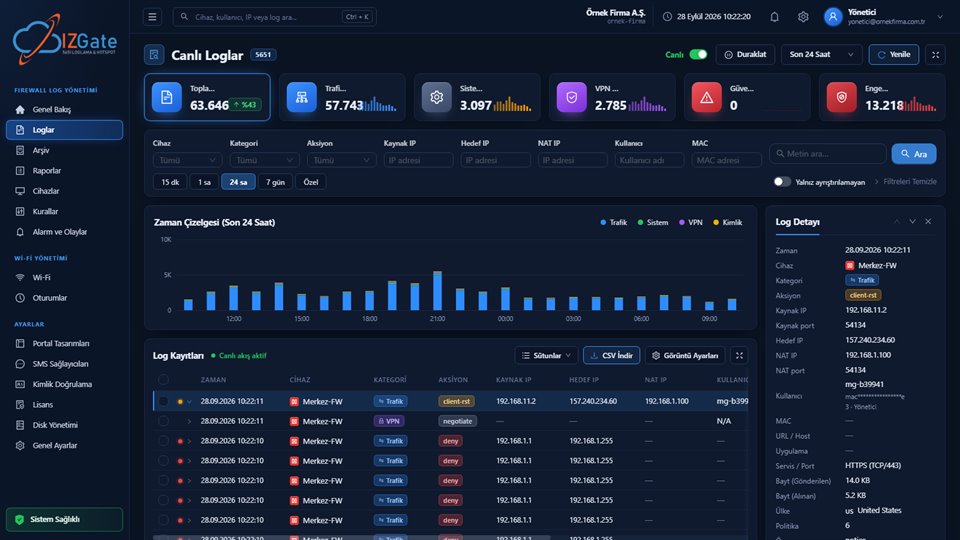
Records are written to the signed archive with the same fields; when a request arrives, you can filter the search screen by NAT IP:port, internal IP, MAC, or user alias code to find the relevant record. For the archive's integrity guarantee, see the log integrity and signatures guide.
Does it depend on the device?
Whether NAT IP:port information gets logged depends on whether your firewall's syslog output carries that field. All the drivers izgate supports — FortiGate, MikroTik, pfSense, and OPNsense — parse this field; for device-specific setup steps, see the FortiGate, MikroTik, and pfSense/OPNsense guides. What matters is that your syslog configuration sends traffic (forward/srcnat) records to izgate; skip this step and the NAT information is never produced in the first place.
This topic often looks unimportant at first glance, because for a home user on a single-person line, the IP alone may be enough. For businesses, however, the picture is different: dozens, sometimes hundreds, of people share the same public IP at the same time on an office, café, hotel, or factory network. At this scale, port information is what decides the difference between "there's a record" and "the record is actually useful."
Checklist
- Does your firewall's syslog output include a post-NAT IP:port field? (Standard on FortiGate, MikroTik, pfSense, and OPNsense.)
- Are your traffic/forward log rules configured correctly toward the syslog destination (izgate)?
- Are all lines where multiple users share the same public IP (office, guest network, factory) covered?
- Can you filter the search screen by NAT IP:port?
Frequently asked questions
Are NAT and CGNAT the same thing?
No. NAT is your own firewall translating the private IPs on your internal network into a single public IP. CGNAT is a higher-level sharing arrangement where your carrier shares your public IP with other customers too. Both produce the same result: a public IP alone points to a group sharing that IP, not to one person, and the port information is what distinguishes the single connection within that group.
If I have a fixed (static) public IP, is NAT port logging still needed?
Yes, if more than one device/user on your internal network shares that single public IP. A fixed IP only guarantees that the IP doesn't change; it does not remove the problem of telling apart multiple users leaving from that IP at the same time.
Where does izgate get this information from — does it generate it itself?
No, izgate does not generate the NAT IP:port information; it already exists in your firewall's traffic log. izgate parses this field out of your firewall's syslog output and combines it with the other fields (internal IP, MAC, user, time) into a single access record, then writes it to the signed archive.
Does this only matter on guest Wi-Fi, or does it apply to the staff network too?
It applies to both. The Regulation's definition of access records makes no distinction between customer/guest/employee; port information is required the same way on any network (office, guest, factory) where the same public IP is shared.
Is it impossible to identify anyone at all without port information?
In some cases the field can be narrowed down with the time window and other information, but on a multi-user NAT line, reliably identifying a single user without port information is usually not possible. This is why the Regulation treats this field as part of the access record definition.
This page is for information only; for the current text of the legislation, refer to the official source (mevzuat.gov.tr).