Access records are defined in Regulation Article 3/1-e with five fields: internal IP address, start/end time of use, MAC address, destination IP address, and — where an IP address is shared among users via ports — the real (NAT) IP and port information allocated to the user. Together, these five fields fully answer the question "which device connected where, and when."
Official definition
The Regulation's full definition reads as follows:
"Erişim kayıtları: Kendi iç ağlarında dağıtılan IP adres bilgilerini, kullanıma başlama ve bitiş zamanını ve bu IP adreslerini kullanan bilgisayarların tekil ağ cihaz numarasını (MAC adresi) gösteren bilgileri, hedef IP adresi, bir veya birden fazla IP adresinin portlar aracılığı ile kullanıcılara paylaştırılması yöntemi ile sunulan internet erişim hizmetinde kullanıcıya tahsis edilen gerçek IP ve port bilgilerini,"
"Access records: Information showing the IP address information distributed on their own internal networks, the start and end time of use, and the unique network device number (MAC address) of the computers using those IP addresses; the destination IP address; and, where internet access service is provided by sharing one or more IP addresses among users through ports, the real IP and port information allocated to the user,"
Regulation on Internet Public Use Providers, Art. 3/1-e — unofficial translation — mevzuat.gov.tr
It helps to split the sentence into five when reading the definition: (1) internal IP address, (2) start/end time, (3) MAC address, (4) destination IP address, (5) NAT real IP and port. Below, we examine each one separately.
Sample log line
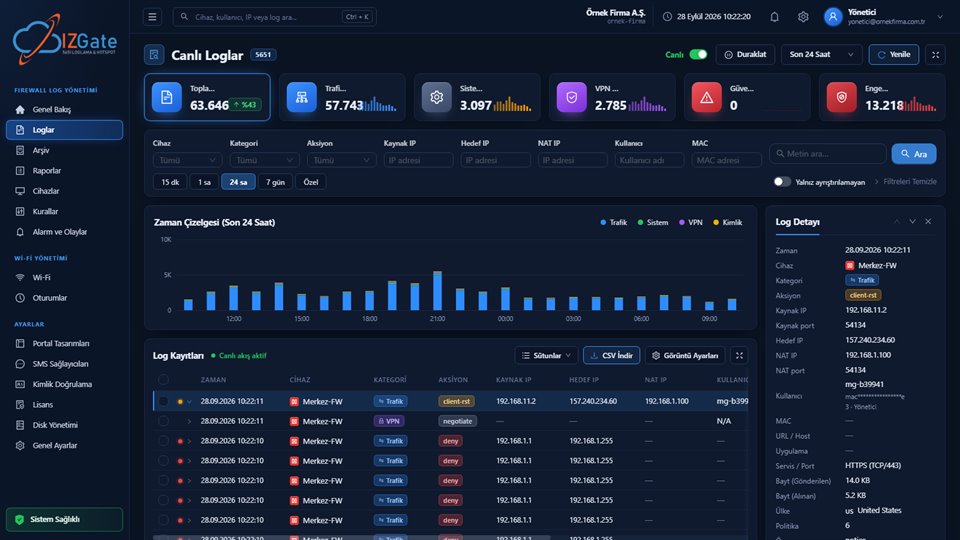
To see how these five fields come together in practice, here's an example of a log detail entry in izgate:
- Time
- 2026-10-04 14:32:07 – 14:47:51
- Internal IP
- 10.20.4.113
- MAC
- 3C:A6:F6:1B:9E:02
- User
- mg-4a300c (alias code)
- Destination IP
- 203.0.113.44:443
- NAT (real) IP:Port
- 88.248.12.7:51342
- Device
- FortiGate-Lobby-01
This single line answers the question: "who made the connection from 88.248.12.7 between 14:32 and 14:47?" Answer: the device using internal address 10.20.4.113, with MAC address 3C:A6:F6:1B:9E:02; in the panel, this alias code resolves to an actual guest or employee record.
Internal IP and timing information
The internal IP is the address a device receives on your local network (for example, your guest Wi-Fi); it's typically assigned dynamically via DHCP, and more than one device can use the same internal IP over time. For this reason, the internal IP alone is not enough — without the start and end time of use, the question "who was on this IP at that moment" cannot be answered. The internal IP and the timestamp together uniquely identify a specific session.
Why the MAC address matters
The MAC address is the network card's unique hardware number, and the Regulation defines it as the "unique network device number." While an IP address can change over time (DHCP renewal, network reconfiguration), the MAC address stays fixed on the same device. So verifying a session first by internal IP and time, then by MAC, also answers the question "could two different devices have used the same IP on the same day?"
In practice, this difference shows up as follows: on a busy guest network, DHCP can assign a freed-up IP to several different devices one after another during the same day. In a system that logs only IP and time, two devices' records can collide right at the boundary of an hour. The MAC address eliminates that collision; which physical device each line belongs to is unambiguous.
Destination IP
The destination IP is the remote address a device connects to. On its own, it does not show which site was visited (that generally depends on your firewall's own URL/host field), but it provides the information "this device connected to this address during this time window," and it's the starting point when an investigation begins. When an authority comes to you with a destination IP and a time window, your search starts from this field: first you find who connected to that destination during that window, then you narrow down to the person through the MAC and user match.
Why the NAT (real) IP and port matter
Most businesses perform NAT (Network Address Translation) so that many devices on the internal network share a single external (real) IP address when going out to the internet. In that case, from the outside, all devices appear to come from the same external IP; the only thing that distinguishes one device from another is the port number in use at that moment. This is why the Regulation separately lists "the real IP and port information allocated to the user, in internet access service provided by sharing one or more IP addresses among users through ports." If port information isn't recorded, an inbound complaint or request only tells you "a transaction was made from this external IP" — you cannot distinguish which internal user made it without the port. We cover this topic in detail in the What Happens If NAT and Port Information Isn't Logged? guide.
How izgate captures these fields
izgate writes every session from your firewall and hotspot devices to the live database and the signed archive together with these five fields; in the record detail, you can also see every additional field your device sends (protocol, data volume, policy, and country information where available).
- Identity matchingAn authenticated user is given an alias code on the firewall; in the panel, that code resolves to the real person (name, masked phone/ID). Raw identity is never written to the firewall.
- MAC verificationThe MAC address is always verified from the firewall's own connection table; MAC-based features are only enabled when it can be verified.
- Filterable searchThe Live Logs screen can be filtered by IP, user, MAC, device, category and action; every field is visible in the record detail.
Checklist
You can ask the following questions to quickly assess whether your current log records are consistent with the legislation:
- Are the start and end time of use kept together with the internal IP in your records?
- Is the MAC address recorded, or is only the IP kept?
- Is destination IP information retained for every session?
- If multiple devices share the same external IP (NAT), is port information recorded separately?
- Are these five fields automatically matched to the user's identity (guest, employee)?
If you answer "no" to any of the five questions, the absence of that field can make it harder to identify who carried out a transaction when a request arrives. For example, in a setup that logs only the external IP and time and skips MAC and port information, you cannot later tell which of ten different devices sharing the same external IP made the relevant connection.
Frequently asked questions
Which fields should an access record contain?
Under Regulation Article 3/1-e: internal IP address, start/end time of use, MAC address, destination IP address, and NAT (real) IP and port information.
Is it enough to just record the IP address?
No. On its own, an IP address does not show which device or person carried out a transaction on shared networks (guest Wi-Fi, behind NAT). The MAC address, timing information and NAT port information are also needed.
Can a MAC address change?
Some devices may use a randomized MAC for privacy purposes, but on most corporate and personal devices the MAC is fixed. izgate always verifies and records the MAC from the firewall's own connection table.
Why does NAT port information matter separately?
Many devices share the same external IP when going out to the internet; the only information that distinguishes them is the port number in use at that moment. If the port isn't recorded, an inbound request shows only the external IP and cannot distinguish which internal user it was.
This page is for information only; for the current text of the legislation, refer to the official source (mevzuat.gov.tr).