Why the internet line is the business's responsibility
An office has a single line that goes out to the internet, and that line is registered in the company's name. A salesperson, an accounting intern, a maintenance contractor's technician, or a visitor who came in for a meeting — all of them go out to the world through the same line, with the same handful of IP addresses. When a website, a competent authority, or a business partner says "such an action was performed from this address," the address they see is your company's; it shows the company's name, not the individual's.
In real office life this means several different roles share the same line at the same time. Regular staff spend most of the day connected to company resources. Managers and the HR/IT team both do their own work and manage others' access. Interns usually join the system for a short period, sometimes needing internet before onboarding is even complete. Contractors and outside service providers — cleaning, maintenance, consulting, or software support — come to the office with their own devices, either regularly or just once. Finally, visitors such as business partners, auditors, or couriers want Wi-Fi for the duration of a meeting.
When these roles mix, the question that comes up is always the same: who performed a given action over the line? If there is no record, or if the record only says "this site was visited from this IP at this time," it is impossible to tell which of the dozens of people behind that IP performed the action. The question stays with the business, unanswered. An identity-matched access record — one that keeps the internal IP, MAC address, user, and time together — closes that gap: the person who performed the action can be shown, and the question of liability does not stay with the business.
This need isn't limited to a single incident. In departments with high staff turnover (sales, call centers, seasonal teams), accounts open and close frequently; being able to answer, during an internal investigation or an IT audit, "who held this account on this date, and which device were they using" becomes a natural part of daily operations. Identity-matched records provide a traceability layer the organization needs continuously, not just for a one-off event; records from a given period stay in the signed archive even after the employee has left.
Legal framework: who has to keep records
The "public use provider" definition in Law No. 5651 makes no distinction between customer and employee; any workplace that provides its staff with internet falls within this definition:
"Toplu kullanım sağlayıcı: Kişilere belli bir yerde ve belli bir süre internet ortamı kullanım olanağı sağlayanı,"
"Public use provider: a person who provides individuals with the means to use the internet at a specific place for a specific period of time,"
Law No. 5651, Article 2/1-i — unofficial translation — mevzuat.gov.tr
The related regulation requires all public use providers, commercial or not, to keep access records electronically and to retain them for a specific period:
"Erişim kayıtlarını elektronik ortamda kendi sistemlerine kaydetmek ve iki yıl süre ile saklamak."
"To record access records electronically in their own systems and retain them for a period of two years."
Regulation on Internet Public Use Providers (2017), Article 4/1-b — unofficial translation — mevzuat.gov.tr
In practice, this means that an examination of a transaction made from inside the organization usually starts with the business that owns the line. The legal basis for processing staff data for this purpose rests on KVKK's "fulfilling a legal obligation" and "explicitly provided for by law" grounds; separately obtaining the employee's explicit consent is not required. The regulation also requires all public use providers to use a content filtering system (Article 4/1-a); that filtering is applied by your firewall's own web filter, and izgate collects the resulting blocking and access records, matches them to the user, and reports on them.
This does not amount to a legal guarantee — it carries no claim of "you won't be fined" or "certain acquittal"; the accurate statement is that you can document who performed the action and respond fully to a request from the competent authorities. For the detailed framework, see the Law No. 5651 and Law 5651 Guide pages, and for the legal side of the employee angle, see the Who Is Responsible for an Employee's Actions? guide.
A realistic scenario
The example below shows how an identity-matched access record works in practice in an office.
A notice arrives stating that your company's outbound (NAT) IP address accessed certain content at a specific date and time. To the outside world, this address is your company's; it doesn't say who did it.
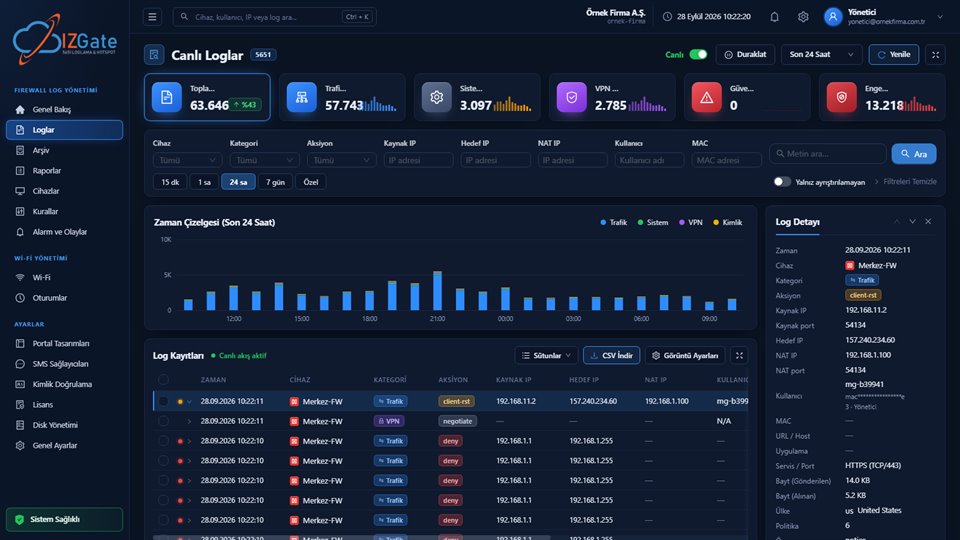
The IT lead filters Live Logs in the panel by NAT port and time range; the internal IP, MAC address, and the user logged in via AD/LDAP at that moment appear automatically matched.
The signed record documents that the access came from the laptop of an intern temporarily assigned to the accounting department; the business clarifies the situation by showing who performed it.
- Time
- 2026-03-14 11:42:07
- Internal IP
- 10.20.4.118
- MAC
- 3C:97:0E:5B:2A:41
- User
- AD/LDAP: intern.ahmetyilmaz (Accounting, Intern)
- Destination
- 185.23.44.210:443
- NAT IP:Port
- 95.12.88.4:41022
- Device
- FortiGate-HQ-01
What matters in this example is that the IT team needs no extra tool or external request to find the record: the Live Logs and log-detail screens already keep internal IP, MAC, and user information together. The same method can be used to trace the source of a security incident, to see who downloaded unlicensed software, or to document a policy violation.
What izgate does in this office
izgate works around the office's real distribution of roles: staff connect with their corporate identity, guests and contractors connect from a separate network, and every session is identity-matched into a signed record. The capabilities below work together from day one of setup and require no additional integration project.
- Staff login via Active Directory / LDAPStaff and interns connect to the office Wi-Fi with the organization's existing AD/LDAP account, without IT having to open a separate account; the session is matched to the corporate identity.
- Separation of staff and guest networksTwo separate networks prevent a visitor's or contractor's device from reaching the file server, printers, and internal applications, and keep each group's records in its own stream.
- Identity-matched access recordsEach line keeps time, internal IP, destination IP/port, NAT (real outbound) IP/port, MAC address, and user together; you can search by user, MAC, or device from a single screen.
- AlertsFailed staff/guest login attempts, unauthorized device connections, and panel or rule changes are reported instantly.
- Signed archiveEvery record is written to a separate disk at the same time as the live data, protected by a SHA-256 chain and an Ed25519 signature, with a qualified timestamp taken once a day.
- ReportsAccess and security summaries can be exported as PDF/Excel/CSV from among 17 ready-made reports; weekly/monthly reports can be scheduled to email or Telegram.
These five or six capabilities work together: AD/LDAP login establishes identity, network separation keeps staff and guests apart, the identity-matched record proves what that identity did, alerts surface anomalies instantly, and the signed archive and reports give both integrity and management visibility to that record.
How it's set up
Choose a deployment model
Choose between izgate Cloud (no setup, up and running in minutes) or an on-premises deployment (logs and archive on separate disks).
Connect your firewall
Connect your FortiGate (REST API), MikroTik (RouterOS 7, SSH/REST API), pfSense, or OPNsense device with the access details you provide; the record is verified against the serial number read from the device.
Set up staff/guest networks and AD/LDAP
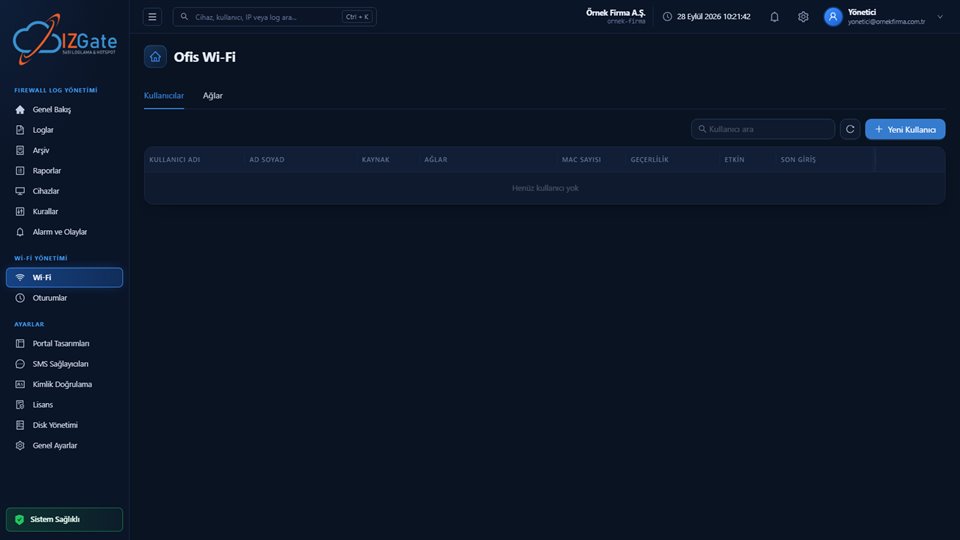
On the Office Wi-Fi screen, match the staff network to AD/LDAP and define a separate network for guests and contractors.
Define alerts and reports
Set up alert channels (email/Telegram) for failed login attempts and unauthorized device connections, and scheduled reports for regular access summaries.
Compliance checklist
- Is a separate login method defined for staff, interns, contractors, and visitors?
- Are the staff network and the guest/contractor network separated?
- Does every access record keep internal IP, MAC, user, destination, and NAT port together?
- Are live and archive records kept on separate disks?
- Is the archive protected by a hash chain + signature + timestamp?
- Has your retention period been set appropriately for your organization?
- If you have more than one branch, are all devices visible from a single panel?
- Is the AD/LDAP integration synced with the current staff list?
- Are your regular access reports and alert notification channels defined?
Frequently asked questions
Is the company responsible for an action taken by an employee?
The internet line and the IP address visible to the outside world are registered to the company, so when a question or request arrives, the business is usually the first point of contact. Identity-matched access records let your business clarify the situation by showing which employee performed the action. This is not a legal guarantee; the final assessment belongs to the competent authorities and your legal counsel.
How do we distinguish temporary users such as interns, contractors, and visitors?
Each group connects to the network with its own login method: staff and interns with a corporate AD/LDAP account, contractors and visitors from the guest network with a visitor code, SMS verification, or administrator approval. In the firewall log, every session appears with a user tag showing who connected and by which method.
Is staff AD/LDAP password data transferred to izgate?
Authentication happens between the firewall and your organization's own Active Directory/LDAP server; izgate logs the result of that session and the user match, and the password never leaves your organization.
Why should the staff and guest networks be separate?
A separate network keeps a visitor's or contractor's device from reaching staff resources (file server, printers, internal applications) and keeps each group's access records separate, without mixing them up.
How long are access records kept?
The retention period is a setting you choose from the panel; two years is recommended under Law 5651 and applied by default. Live and signed archive records are kept in parallel for that whole period.
If we have more than one office or branch, do we manage them from a single panel?
Yes. Each branch's firewall device is added to the panel with its own record; live search, alerts, and archive export are filtered by device, location, or date range and managed from a single panel.
Is content filtering (blocking websites) done by izgate?
No. Content filtering is applied by your firewall's own web filter; izgate collects the blocking and access records produced by that filtering, matches them to the user, and reports on them.
How long does it take to add a new hire to the network?
As soon as the employee is added to the organization's AD/LDAP system, they can connect to the office Wi-Fi with that same account; no separate user needs to be defined on the izgate side, and the session is automatically identity-matched on first connection.
This page is for information only; for the current text of the legislation, refer to the official source (mevzuat.gov.tr).