The Regulation asks public use providers to use a content-filtering system that prevents access to content constituting a crime; they may also take out a safe internet service as an additional measure if they choose. The party that actually applies this filtering is your firewall (its web-filter feature); izgate is not a filter — it collects the block records the filter produces, matches them to a user, and reports them.
What the Regulation requires: a content-filtering system
Article 4 of the Regulation defines a general obligation that applies to all internet public use providers:
"Konusu suç oluşturan içeriklere erişimi önleyici tedbirleri almak amacıyla içerik filtreleme sistemini kullanmak."
"To use a content-filtering system in order to take measures preventing access to content that constitutes a crime."
Regulation on Internet Public Use Providers, Article 4/1-a — mevzuat.gov.tr — unofficial translation
The Regulation's definitions article describes a "filtering system" as software and hardware that blocks access based on criteria such as web address, domain name, IP address, keyword, and similar. This is not an internet service — it is a function undertaken by a device on your network, typically your firewall.
An additional measure: safe internet service
Alongside content filtering, the Regulation also mentions an optional additional measure:
"İnternet toplu kullanım sağlayıcılar, konusu suç oluşturan içeriklere erişimi önleyici tedbirleri almak amacıyla içerik filtreleme sisteminin yanı sıra, ilave tedbir olarak güvenli internet hizmeti de alabilirler."
"Internet public use providers may, alongside the content-filtering system, also take out safe internet service as an additional measure to prevent access to content that constitutes a crime."
Regulation on Internet Public Use Providers, Article 4/2 — mevzuat.gov.tr — unofficial translation
Safe internet service is a service offered by your access provider (your internet service provider) that restricts access according to predefined categories; it is not a part of izgate and is not provided by izgate. The word "may" shows that for general public use providers this is an optional add-on.
An extra obligation for commercial-purpose providers
Article 5 of the Regulation sets out a stricter framework only for internet public use providers acting for commercial purposes (internet cafés and similar venues that sell internet access for a fee):
"Ailenin ve çocukların korunması ile konusu suç oluşturan içeriklere erişimi önleyici tedbirleri almak amacıyla içerik filtreleme sistemini ve güvenli internet hizmetini kullanmak,"
"To use a content-filtering system and safe internet service in order to protect the family and children and to take measures preventing access to content that constitutes a crime,"
Regulation on Internet Public Use Providers, Article 5/1-b — mevzuat.gov.tr — unofficial translation
"Kullanılan içerik filtreleme sistemini aktif ve güncel halde bulundurarak, herhangi bir müdahale ile devre dışı kalmasını önlemek,"
"To keep the content-filtering system in use active and up to date, preventing it from being disabled by any intervention,"
Regulation on Internet Public Use Providers, Article 5/1-c — mevzuat.gov.tr — unofficial translation
These two provisions require commercial-purpose providers to use content filtering together with safe internet service, and to keep the filter continuously active and up to date. An office, hotel, café, or factory offering free internet generally does not fall under this definition; the general filtering obligation in Art. 4/1-a still applies to these businesses, but the additional requirements in Art. 5 (along with the operating-permit and fixed-IP requirements) concern only commercial-purpose providers.
Who applies the filtering
In practice, the party applying content filtering is the firewall on your network. Devices such as FortiGate, pfSense, OPNsense, and MikroTik activate category- or address-based blocking rules through their own web-filter features. Defining, updating, and keeping these rules active is the responsibility of whoever manages that device — you, or the team managing it on your behalf.
Keeping the filtering decision at the firewall level also provides flexibility: a school can define different category restrictions for different age groups, while an office can disable certain categories (such as gaming or social media) during working hours. izgate doesn't interfere with the content of these rules; it only makes the rule's outcome (what request was blocked, by whom, and when) visible. This separation also clarifies responsibility: you are responsible for the content of the filtering rule, and izgate is responsible for the accuracy and retention of the record the filter produces.
Where to get safe internet service
Safe internet service is not a part of izgate; it is offered by your internet access provider (your ISP) and generally activated at the subscription level. The Regulation defines this service as an optional "additional measure" for general public use providers, and as a measure expected to be used together with content filtering for commercial-purpose providers. What level of this service your business should take out is a matter to discuss with your access provider and, if needed, your legal counsel.
In practice, this means your firewall's content filter and the safe internet service are two complementary layers: one runs inside your network (the firewall), the other outside it (your access provider). izgate is the third, observing layer that collects and reports the block records produced by both of these layers (the logs coming from your firewall).
izgate's role: recording and reporting
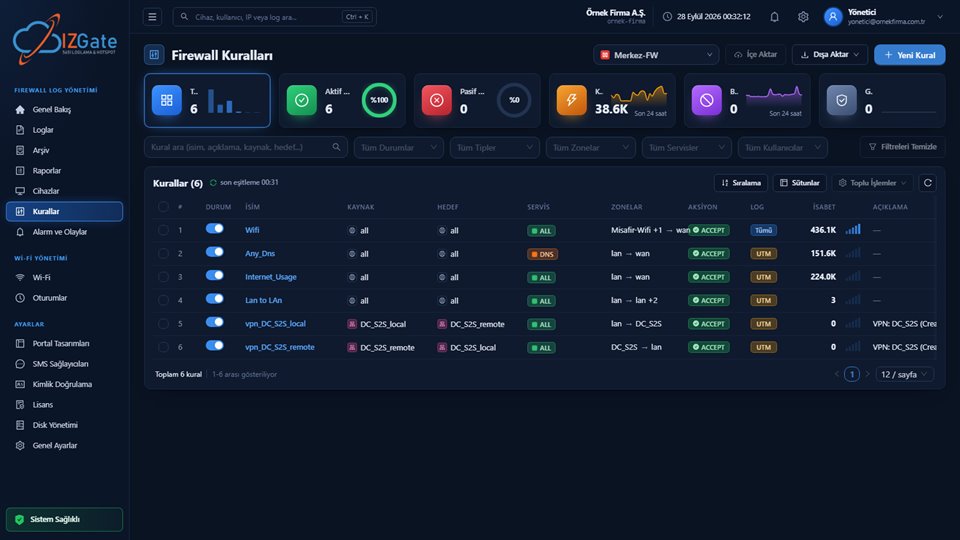
izgate is not a filter and does not make filtering decisions. What it does is collect the block logs your firewall produces, match these logs to an identity (which user tried to access which category, which destination), and make them searchable and reportable. It also displays the filtering rule on the firewall itself — its enabled/disabled state, change history, and hit counts — on the Rules page.
Visibility of blocked traffic
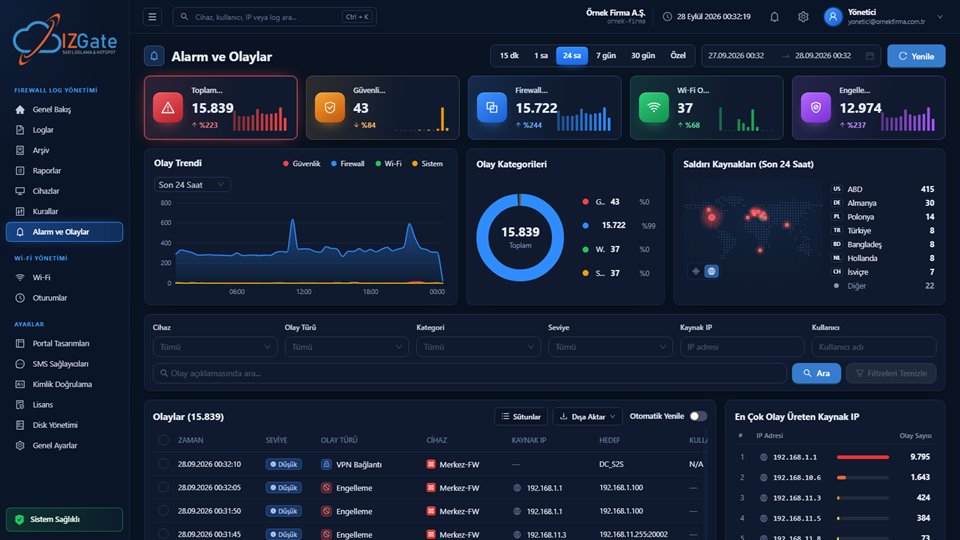
The Alerts and Events page lists blocked traffic classified from firewall logs, such as web filter and application control categories, together with user and time information. Summaries of blocked traffic can also be obtained from the ready-made reports on the Reports page as PDF, Excel, or CSV, and sent on a schedule by email/Telegram.
Example: a school network
The web filter on the school's firewall blocks a student device's attempt to access an inappropriate content category.
The block event is written to izgate with the alias code of the student account connected to the network at that moment, along with a timestamp.
School administration can see the blocked access attempts per user from the Alerts and Events page or the weekly report.
The same mechanism also works for a different purpose in an office: an IT manager defines a rule on the firewall that blocks a certain category (e.g., file-sharing sites) during working hours; izgate collects the block events this rule produces and summarizes, in a monthly report, which staff member tried to access that category and how often.
Checklist
- Is a content/web filter active on your firewall?
- Are filter rules kept up to date, and monitored against being disabled?
- Can you view blocked traffic per user?
- If you provide internet public use for commercial purposes, have you also taken out safe internet service?
- Are your block records stored in the signed archive together with your other traffic records?
- Can you see from the panel who changed a filter rule, and when?
Frequently asked questions
Does izgate perform content filtering?
No. Content filtering is applied by your firewall's web filter (such as the filtering features on FortiGate, pfSense, OPNsense, or MikroTik). izgate collects the block logs this filter produces, matches them to a user, and reports them; it is not the filter itself.
Is using a content-filtering system mandatory for everyone?
Article 4/1-a of the Regulation requires all internet public use providers to use a content-filtering system. Additional obligations — such as keeping the filter active and up to date, and supporting it with a safe internet service (Art. 5/1-b, c) — apply only to internet public use providers acting for commercial purposes.
Is subscribing to a safe internet service mandatory?
For general public use providers, safe internet service is an optional additional measure that may be taken alongside content filtering (Art. 4/2). For internet public use providers acting for commercial purposes, it is expected to be used together with the content-filtering system (Art. 5/1-b). We recommend consulting your legal counsel for your specific situation.
Where can I see blocked traffic?
The Alerts and Events page lists the traffic blocked by your firewall's web filter together with user and time information. Ready-made reports on the Reports page also provide a summary of blocked traffic as PDF/Excel/CSV.
Will izgate notice if the filter is turned off on the firewall?
izgate shows the enabled/disabled state and change history of the rules on your firewall on the Rules page; disabling a rule shows up there and in the rule-change alert. Keeping the filter continuously active and up to date is the responsibility of whoever manages that rule — you.
Where do I get a safe internet service?
Safe internet service is offered by your internet access provider (your ISP); it is not a part of izgate. izgate collects and reports the block records produced by this service and by your firewall.
This page is for information only; for the current text of the legislation, refer to the official source (mevzuat.gov.tr).
Related guides
Employee Internet Use: Who Is Responsible?
Why it also matters for block records to be identity-matched.
PracticeLog Integrity: Hash Chains, Signatures, and Verification
Block records are kept in the same signed archive, too.
PracticeWhat Is a Hotspot and Captive Portal, and How Do They Work?
Where filtering meets identity on the guest network.