
Find a specific person
Search by masked identity, alias code, IP, or MAC to see when a guest connected and which method verified them.
The Sessions page gathers every connection on your Guest Wi-Fi and Office Wi-Fi into two separate tabs: "Guest Sessions" (verified through the portal) and "RADIUS Sessions" (opened via RADIUS auth/accounting). Both can be searched with date range and status filters.
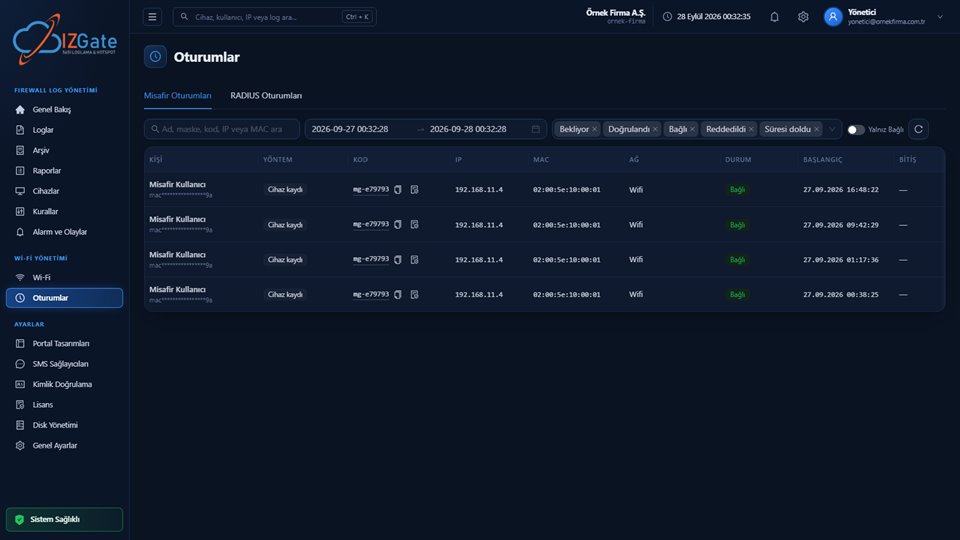
Person, Method, Code, IP, MAC, Network, Status, Start, and End columns; the search box works by name/mask/code/IP/MAC.
User, IP, MAC, Device, Network/SSID, Start, End, Incoming/Outgoing traffic columns; search by user/IP/MAC.
Both tabs have a date range picker at the top; Guest Sessions also has a multi-select status tag filter (Pending, Verified, Connected, Rejected, Expired) and a "Connected Only" toggle.
Table columns: Person (name + masked identity on a sub-line), Method (e.g. "Device registration"), Code (alias code, copyable), IP, MAC, Network, Status (e.g. a green "Connected" badge), Start, and End (shown as "—" if not yet expired). At the top are a person/mask/code/IP/MAC search box, a start-end date range picker, a multi-select status tag filter (Pending, Verified, Connected, Rejected, Expired), and a "Connected Only" toggle.
On the API side, this table also carries the firewall user status and, if present, the firewall error information (fw_error); it's possible to trace from here why a guest couldn't get online (for example, a firewall API error).
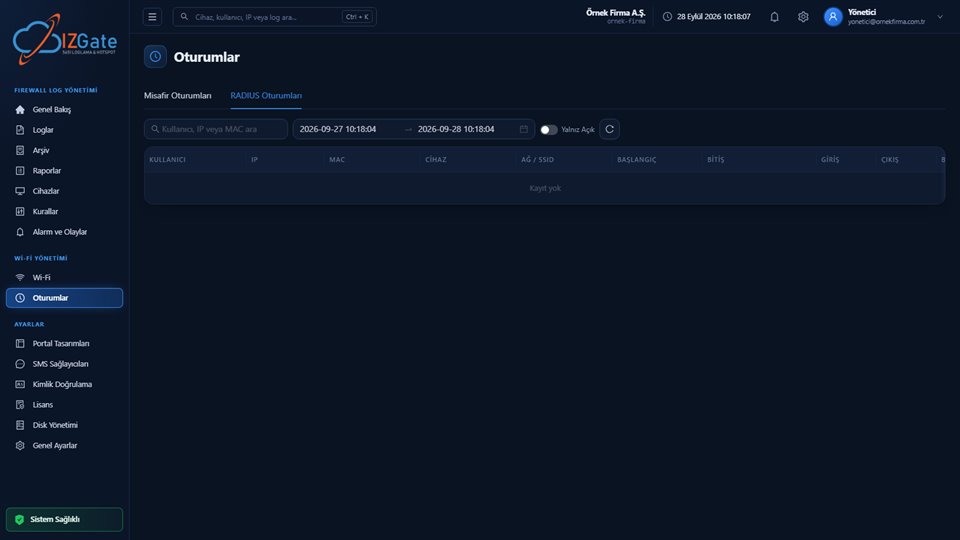
Table columns: User, IP, MAC, Device, Network/SSID, Start, End, Incoming, and Outgoing (traffic volume) — a "No records" message is shown if there's nothing to list. At the top are a user/IP/MAC search box, a date range picker, and an "Open Only" toggle.
This tab shows session records coming through RADIUS Accounting (1813/UDP); the session-to-user match is made with the RADIUS Class attribute, and sessions that go quiet (accounting has stopped) are automatically closed after 30 minutes.
Search by masked identity, alias code, IP, or MAC to see when a guest connected and which method verified them.
Filter sessions marked "Rejected" or carrying a firewall error to see exactly where things stalled, during verification or firewall handover.
Turn on "Connected Only" (guest) or "Open Only" (RADIUS) to list only the users currently on the network.
Switch to "Guest Sessions" for a Guest Wi-Fi connection, or "RADIUS Sessions" for office/RADIUS.
Use the date range picker at the top to focus on the day/time the event happened.
Search by name, masked identity, code, IP, or MAC; narrow further with status tags if needed.
Read the method, verification time, start/end, and any firewall error information from the row.
Raw identity (phone/Turkish ID number) is never shown in Guest Sessions; a person is represented by their masked identity and fixed alias code. RADIUS Sessions is fed only by RADIUS packets whose Message-Authenticator has been correctly verified — incorrectly signed packets are silently rejected and never appear in this tab. A RADIUS session that has gone quiet (accounting has stopped) can still show as "open" for up to 30 minutes even though the actual connection has dropped.
Guest Sessions shows connections verified through the portal (SMS, Turkish ID number, voucher, approval, etc.). RADIUS Sessions lists sessions opened through the RADIUS auth/accounting protocol (guest connections on Office Wi-Fi and RADIUS-capable firewalls).
Turn on "Connected Only" in Guest Sessions, or "Open Only" in RADIUS Sessions, to list only sessions that are active at that moment.
Yes, the status in a Guest Sessions row shows as "Rejected" or "Expired"; if there's an issue on the firewall API side, that information is attached to the session too.
izgate doesn't notice immediately when accounting packets stop; a session that has gone quiet is automatically closed after 30 minutes.
Yes, in either tab you can pick the past period you want with the date range picker at the top and apply your search/filters within that range.
Configure izgate Cloud based on your number of firewall devices and storage needs; no setup, get started in minutes. Call us with any questions.