
Add new staff
Use "New User" to set a username/password and attach the user to the relevant Office Wi-Fi network.
The Office Wi-Fi page is a completely separate flow from the guest portal: staff authenticate with RADIUS PAP against a local username/password defined in izgate. The page has two tabs, Users and Networks.
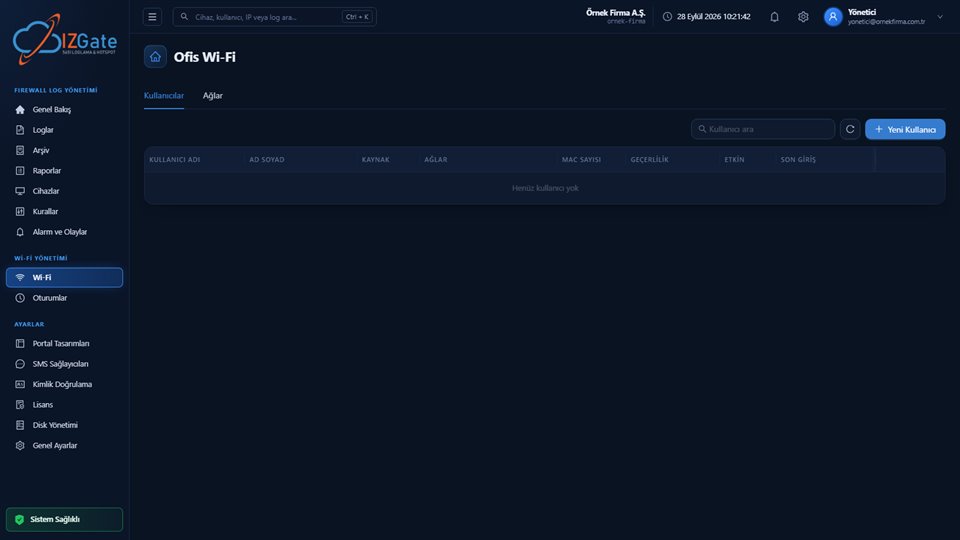
Table columns: Username, Full Name, Source, Networks, MAC Count, Validity, Active, and Last Login; a search box sits above, with a "New User" button in the top right.
A second tab listing the networks attached to Office Wi-Fi (separate from the Networks tab under Guest Wi-Fi, for office-type networks).
If no user has been defined yet, the table shows a "No users yet" message.
A local user is defined in izgate for each staff member: username/password, an optional MAC list (restricting which devices the user may connect from), and an expiration date (for example, a last-use day for a contractor whose contract is ending). The "Active" column lets you temporarily disable a user, "Last Login" shows when they last connected, and "Source" indicates where the user was defined from.
Authentication runs over RADIUS PAP; the NAS (firewall) shared secret is read from the device record matched in RADIUS Sessions.
Use "New User" to set a username/password and attach the user to the relevant Office Wi-Fi network.
If you want a user to connect only from specific devices, define a MAC list for them.
For temporary staff or contractors, set an expiration date so that access automatically ends.
RADIUS Auth (1812/UDP) and Accounting (1813/UDP) are used; each packet's Message-Authenticator field is verified with HMAC-MD5, and packets that fail verification are silently dropped. An Accounting-On/Off signal only closes that NAS's (that firewall's) own sessions and does not affect other devices.
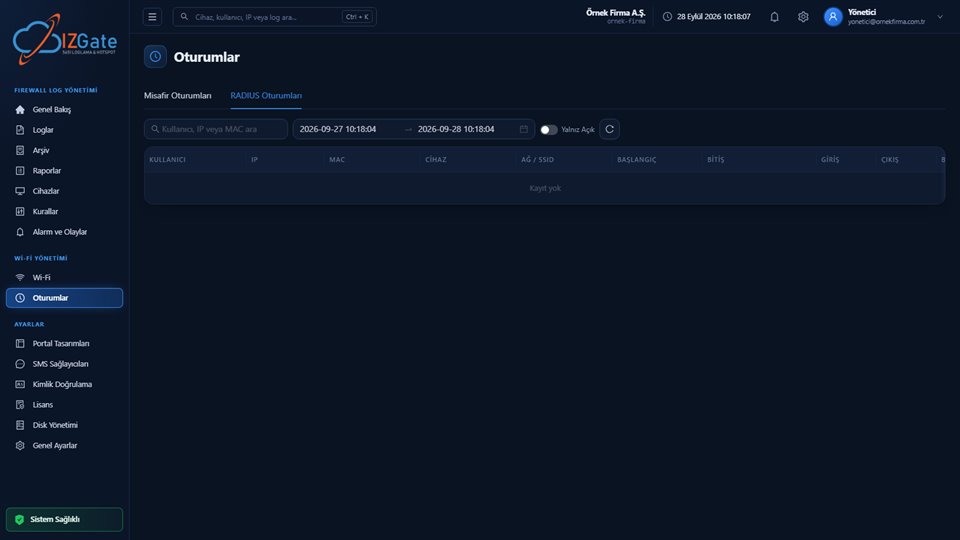
Session-to-user matching uses the RADIUS Class attribute; a session that goes quiet (accounting has stopped) is automatically closed within 30 minutes. You can monitor every open session from the "RADIUS Sessions" tab on the Sessions page.
On the Users tab, use "New User" to set a name, username, and password.
Attach the user to the relevant Office Wi-Fi network (defined on the Networks tab).
Fill in these fields if device restriction or an expiration date is required.
On the firewall side, define izgate as the RADIUS server (with a shared secret); the connection then appears on the Sessions page.
Office Wi-Fi today supports only local user authentication over the RADIUS PAP protocol. Certificate-based 802.1X/EAP-PEAP authentication (sourced from local/AD/LDAP directories) is not yet available; it is on the roadmap. The NAS shared secret is read from the device record — if it is not set, or is incorrect, RADIUS requests cannot be verified.
Yes, both are managed from the izgate panel, but they are separate flows: Office Wi-Fi uses a local-user model over RADIUS, while Guest Wi-Fi works through a captive portal and multiple authentication methods.
Not yet. Today, Office Wi-Fi supports only local-user authentication over RADIUS PAP; certificate-based 802.1X/EAP is on the roadmap.
Yes, by defining a MAC list for the user so they can connect only from those devices.
Set an expiration date on the user record; after that date, the user can no longer authenticate over RADIUS.
From the "RADIUS Sessions" tab on the Sessions page, with user, IP, MAC, device, and traffic information.
Configure izgate Cloud based on your number of firewall devices and storage needs; no setup, get started in minutes. Call us with any questions.