
Off
NVİ verification is disabled. Even if a TC Kimlik No is entered, the record is marked "declared" and is not counted as verified.
The Authentication page determines how login with a Turkish ID number (TC Kimlik No) on your guest networks is verified against the NVİ Identity Sharing System (KPS): provider mode, service address, and a connection test with a sample person are all managed here.
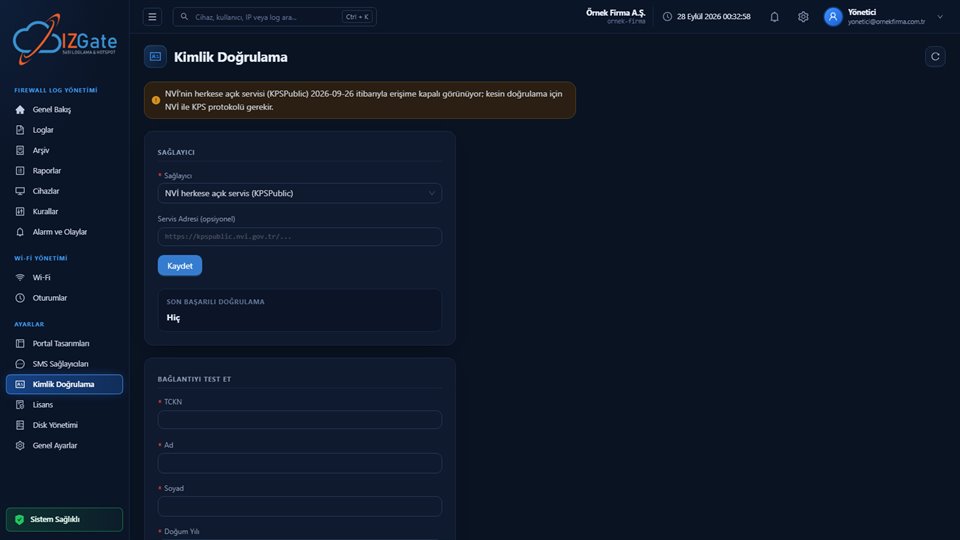
An orange banner at the top shows the current status of NVİ's public service (KPSPublic) and notes that the corporate KPS protocol is needed for guaranteed verification.
A provider dropdown (the example shows "NVİ public service (KPSPublic)" selected), an optional Service Address field, a "Save" button, and below it a "Last Successful Verification" value (shown as "Never" in the example).
A sample person's TC Kimlik No, First Name, Last Name, and Birth Year are entered and tested; this form continues further down the page.
NVİ verification is disabled. Even if a TC Kimlik No is entered, the record is marked "declared" and is not counted as verified.
Looks for an exact match of TC Kimlik No + first name + last name + birth year against NVİ's public SOAP service. Current status: this service currently appears to be unreachable (bot protection/shut down); the panel surfaces this in the banner above.
Connects to the corporate NVİ KPS protocol with a username/password. This mode activates once credentials/test access are provided; it is ready in code.
After selecting and saving a provider, you can send a real verification request to NVİ by entering a known TC Kimlik No, First Name, Last Name, and Birth Year into the Test Connection card on the same page. The result is written to the "Last Successful Verification" field above, so you can see whether the integration works before going into production.
The test result is also recorded in the kps.last_ok_at and kps.last_error settings; if a network has trouble with national-ID verification, check this page's current status first.
The "TCKN" checkbox is enabled on the guest network's Authentication tab.
The portal shows separate fields for TC Kimlik No + first name + last name + birth year.
If NVİ verification is required on the network (the default), the details are checked against NVİ KPS for an exact match.
If the provider cannot be reached, or the details don't match, login is rejected; it is never silently accepted as "declared."
NVİ's public query service (KPSPublic) currently appears to be unreachable; as a result, real-time NVİ verification is ready in the software and will activate once a connection to the corporate KPS protocol (username/password) is in place. Until that connection is established, NVİ verification cannot be enabled on networks; in the meantime you can continue with other methods (SMS, voucher code, admin approval, etc.). While NVİ verification is off on a network (tckn_kps=false), a national-ID record is kept only as a declaration and is not counted as verified.
Yes, when NVİ verification is enabled on the network: the TC Kimlik No, first name, last name, and birth year are checked for an exact match against the NVİ Identity Sharing System (KPS); login is rejected if they don't match or the provider can't be reached.
NVİ's public service (KPSPublic) currently appears to be unreachable. Guaranteed verification will activate once a connection to the corporate KPS protocol (username/password) is in place; this feature is ready in code and awaiting production access.
No. When NVİ verification is required on a network, being unable to reach the provider rejects the login request; it never silently falls back to declared information.
Enter a known TC Kimlik No, first name, last name, and birth year into the "Test Connection" form on the Authentication page, and see the result in the "Last Successful Verification" field.
You can turn off the TCKN method on the network and continue with other methods such as SMS, voucher codes, or admin approval; you can re-enable TCKN once the NVİ connection is ready.
Configure izgate Cloud based on your number of firewall devices and storage needs; no setup, get started in minutes. Call us with any questions.