Short answer: A dedicated hardware appliance arrives with a fixed capacity that's hard to expand, in a closed system. On-premises software runs on your own server; you take on the hardware and the maintenance, but the data never leaves your organization. A cloud service leaves server and disk management to the provider; it needs no installation, but the data is held on the provider's infrastructure. All three can satisfy 5651's access-record obligation; the difference is in how the cost is distributed and who carries how much of the workload.
Three paths, three different splits of responsibility
These three approaches aren't mutually exclusive; some businesses use different models at different branches (an on-premises setup at head office, say, and the cloud at a remote branch). What matters is that whichever model you choose can record the fields 5651 requires (internal IP, MAC, destination, NAT port, time) completely and store them for two years with their integrity intact.
The Regulation defines the obligation to keep access records without specifying a device or deployment model (see the Law No. 5651 guide); how you meet it is up to you. The three common approaches carry responsibility at different points: with a hardware appliance, the manufacturer sets the capacity and software in advance; with on-premises software, the server and disk are in your hands; with cloud, both belong to the provider.
Side-by-side comparison
| Feature | Hardware appliance | On-premises software | Cloud |
|---|---|---|---|
| Where the data lives | Inside the appliance | Your own server | The provider's data center |
| Capacity expansion | Usually limited/hard | By adding disk | By upgrading the plan/GB |
| Server maintenance | Depends on the vendor | On you | On the provider |
| Setup time | Depends on appliance install | Needs server + disk prep | Usually minutes |
| Cost structure | High upfront payment | Hardware + license | Regular, usage-based |
| Multiple firewall brands | Usually vendor-locked | Possible with driver-independent software | Possible with driver-independent software |
This table summarizes general tendencies; the actual capacity and flexibility of a specific product vary by manufacturer.
There's a question this table doesn't show but that matters when deciding: when something goes wrong (a disk failure, a software bug, hitting capacity), who's responsible? With a hardware appliance this is usually limited to the warranty period and vendor support; with on-premises software, responsibility rests largely with your own IT team; with cloud, server and disk issues are the provider's responsibility, and you're only responsible for your own account settings (e.g. the disk ratio).
Dedicated hardware appliance (box)
In this approach, log collection and archiving run on a physical device delivered to you. Its advantage is simple installation: you plug the box into the network and configure the basics. Its disadvantage is that capacity and flexibility are largely limited by what the manufacturer set — as your log volume grows, you may need to buy an additional box or move to a bigger model, and software updates and new features depend on the manufacturer's schedule.
Another trait of this model is that it's often designed to work with a specific firewall brand or a limited device list. As your business grows and starts using different firewall brands at different branches, you may need a separate box for each one, or to track unsupported brands separately with another system — which over time increases both cost and management complexity.
On-premises software
When you run the software on your own server, you choose and scale the hardware and disk capacity yourself; your logs never leave your organization. izgate's on-premises model (IzGate License) falls into this category: it's installed on a single server via Docker on Linux, two separate disks are required for live logs and the signed archive (the installer script enforces this), and the license is assigned per firewall device, per year. The split of responsibility is clear: keeping the server running, monitoring disk capacity, and choosing when to update are on you; in exchange, data never leaves the organization.
Cloud service
In the cloud model, server and disk management sit with the provider; you just use your panel. On izgate Cloud, your account opens automatically after purchase; disk space is split between live logs and the archive by default in a 30/70 ratio (the live side must be at least 10 GB), and you can change that ratio yourself from Settings > Disk Management. Pricing is shaped by the number of firewall licenses and the log retention space you choose. Even if a tenant account is suspended or disabled, data is not deleted under 5651 — only access is restricted.
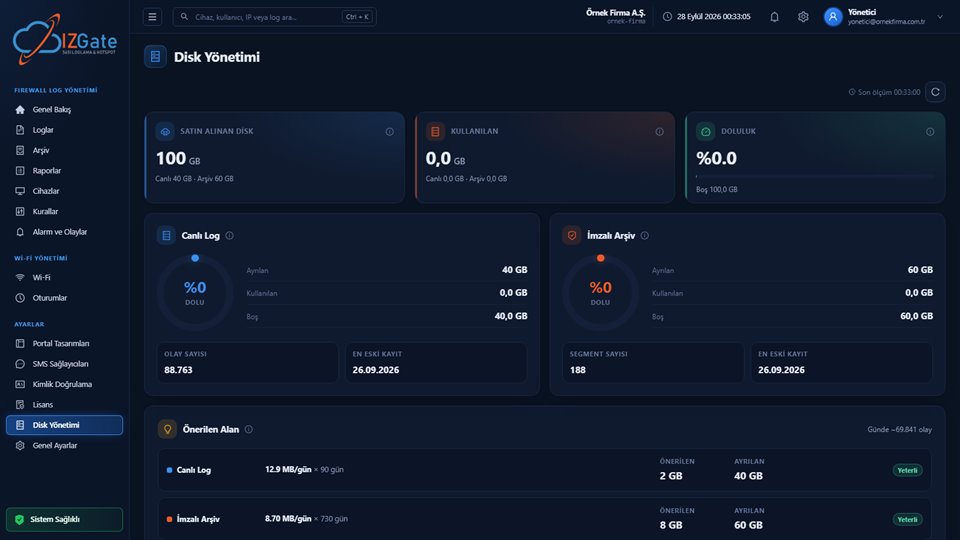
izgate itself doesn't sell a dedicated hardware appliance; it's software that works with your existing firewall (FortiGate, MikroTik, pfSense, OPNsense) and offers two deployment forms (on-premises or cloud). For how license states appear in the panel, see the selection criteria guide.
A growth scenario: from one branch to a chain
For a single-branch business with one firewall, the difference between the three models on setup day may look small. The difference shows up as the business grows: when a second branch opens, the appliance model may require buying a new box or pushing the capacity of the existing one. With on-premises software, you can set up a separate server for the second branch, or (if your network allows it) add new devices to a central server; either way, hardware planning is on you. In the cloud model, adding the new branch's firewall from the panel and, if needed, upgrading the disk/GB plan is enough — no additional server setup is required. This is why the cloud model stands out as an option that reduces planning overhead for fast-growing businesses or those with an uncertain number of branches.
How should you choose?
- If your IT staff is small, or you don't want to deal with server maintenance: the cloud model leaves setup and maintenance to the provider.
- If it's a policy requirement that your data never leave the organization: on-premises software keeps your logs on your own server.
- If your firewall brand might change over time, or you use more than one brand: driver-independent software (on-premises or cloud) is more flexible than an appliance tied to a specific manufacturer.
- If your log volume will grow fast: scaling an appliance usually means buying a new device, while software/cloud is solved by adding disk or upgrading the plan.
Can you switch models later?
Starting with one model and later moving to another is a situation that comes up often in practice: a business that started with an on-premises setup, for example, may decide it doesn't want to deal with server maintenance and move to the cloud model; or an organization using the cloud may move to on-premises when its data policy changes. On izgate, this move can be made without changing your workflow, since both share the same log/search/archive architecture; the technical steps of the move (data migration, new device registration) are planned together with a quote or support process. With the appliance model, there's usually no such migration path at all — moving to a different model generally means abandoning the existing device entirely and setting up from scratch.
Frequently asked questions
Does izgate sell a dedicated hardware appliance?
No. izgate is software that works with your existing firewall (FortiGate, MikroTik, pfSense, OPNsense); you can install it on your own server via Docker on-premises, or purchase izgate Cloud and leave server management to İzHost.
Can I move between on-premises and cloud?
Both models share the same log, search, and archive architecture; the operating logic doesn't change — only who is responsible for the server and disk changes. Switching models is technically possible when growth or a policy change calls for it.
Is there a performance penalty in the cloud?
Both models use the same log, search, and archive architecture; no architectural performance difference is expected. The cloud model also means you don't have to deal with disk and server maintenance.
What's the biggest risk with a hardware appliance?
Capacity and flexibility are usually limited by what the manufacturer set; there's a risk the box becomes insufficient as your log volume grows or once you start using more than one firewall brand.
Where can I see pricing?
Pricing isn't shared on this page; on izgate Cloud, price is calculated based on your firewall license count and log retention space on the purchase page; for the on-premises model, you can use the demo request form.
This page is for information only; for the current text of the legislation, refer to the official source (mevzuat.gov.tr).