
Keep multiple templates
Create separate templates for different brands or industries and attach them to whichever network you want; duplicate a template and modify the copy.
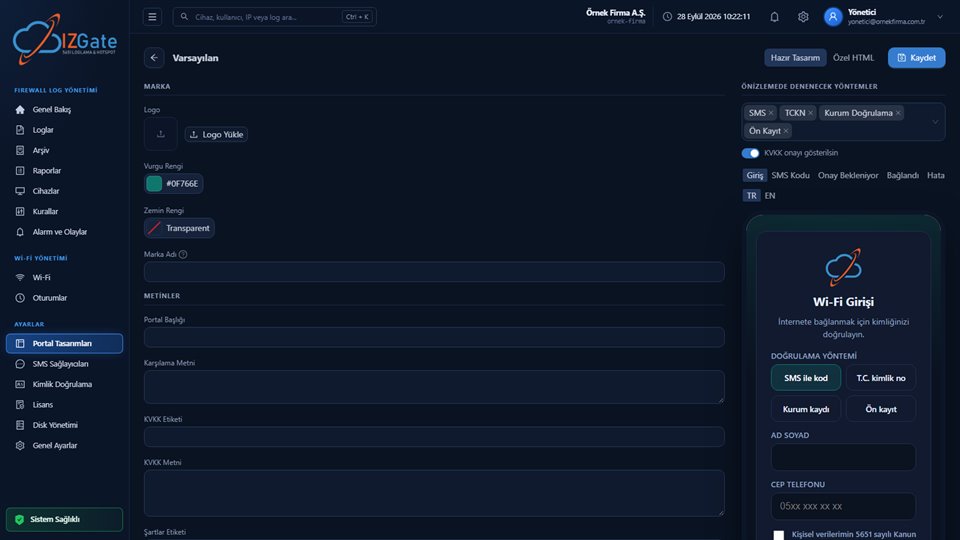
Portal Designs are network-independent, reusable templates. You can customize the ready-made theme with a logo/colors/text, or write your own HTML; either way, you see a live preview on the right, rendered with the real template.
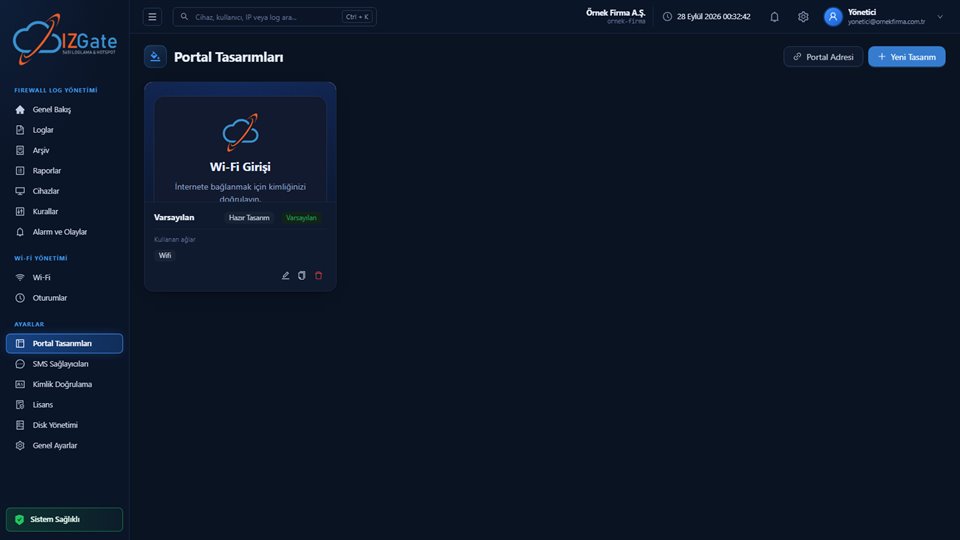
Each template is listed as a card with a small preview (logo, heading, subtext), its name, its type ("Custom Design" or "Default"), tags for the networks that use it, and edit/duplicate/delete icons.
"Portal Address" and "New Design" buttons sit in the top right.
Opening a template shows Brand/Text sections on the left, and on the right a "Methods to Try in Preview" selector, a KVKK toggle, step tabs (Login, SMS Code, Awaiting Approval, Connected, Error), TR/EN language tabs, and the live-rendered portal card below. A "Ready-Made Design"/"Custom HTML" selector and a "Save" button sit at the top.
The Brand section lets you upload a logo and set an accent color (a color code, e.g. #0F766E), a background color, and a brand name. The Text section includes fields such as Portal Title, Welcome Text, KVKK Label, KVKK Text, and Terms Label — the page continues as you scroll down. All text is entered independently for TR/EN, and can be compared instantly using the language tab in the preview panel.
In the "Methods to Try in Preview" box on the right, you can add the methods you want (such as SMS, National ID, Corporate Verification, Pre-Registration) and test how the preview looks with those methods; the "Show KVKK consent" toggle lets you turn the consent checkbox on or off.
Switching to "Custom HTML" in the editor's top bar lets you write your own HTML page, or upload a ZIP containing images/CSS/JS/fonts. The only requirement is that your page include the {{izgate.content}} placeholder — the form and authentication flow is always managed by izgate and cannot be bypassed.
ZIP imports look for index.html (at the root or inside a single folder); allowed file types (png, jpg, gif, webp, svg, ico, css, js, woff, woff2, ttf) are imported, while other file types are skipped and listed in the response. Relative assets/… paths and the {{asset:ad}} syntax are supported within the page.
Create separate templates for different brands or industries and attach them to whichever network you want; duplicate a template and modify the copy.
Because the live preview is rendered with the real template, you can test how every step (Login, SMS Code, Awaiting Approval, Connected, Error) looks before saving.
Use the "Portal Address" button on the list page to quickly reach the network's guest portal address.
From the list page, use "New Design" and give it a name.
Fill in the brand/text form with "Ready-Made Design," or write/upload your own page with "Custom HTML."
Check it in the live preview by selecting different methods and TR/EN languages.
After saving, select this template from the Portal tab of the relevant guest network.
If your Custom HTML page is missing the {{izgate.content}} placeholder, the template cannot be saved — this field is required to prevent the authentication flow from being bypassed. The panel preview runs in an iframe with sandbox="allow-scripts"; same-origin permission is not granted, so the customer's custom HTML cannot reach the panel session. If a template is attached to more than one network, changes to it affect every network using it.
Yes. In the editor, switch to "Custom HTML" to write your own page, or upload a ZIP containing images/CSS/JS. Your page must include the {{izgate.content}} placeholder.
Yes, designs are network-independent; you can attach the same template to more than one network. The template card shows tags for which networks use it.
Yes, the live preview on the right side of the editor is rendered with the real template; you can test how it looks with different methods and languages before saving.
Yes, portal text (title, KVKK, terms, etc.) is entered independently for TR and EN, and can be compared using the language tab in the preview.
No. The panel preview runs inside a sandboxed iframe with no same-origin permission; scripts on your page cannot reach the panel session.
Configure izgate Cloud based on your number of firewall devices and storage needs; no setup, get started in minutes. Call us with any questions.